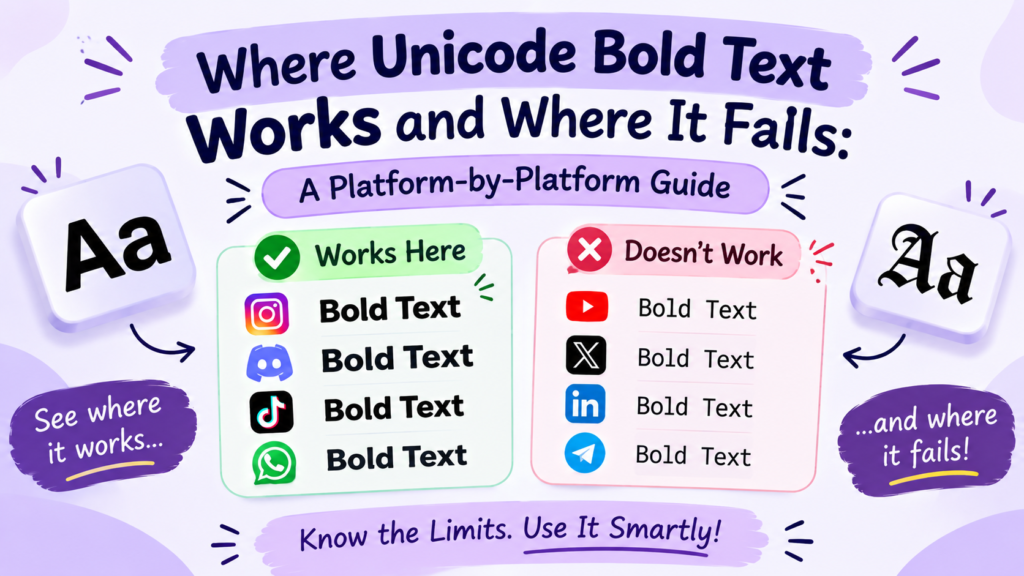
Where Unicode Bold Text Works and Where It Fails: A Platform-by-Platform Guide
Introduction
Unicode bold text, such as 𝗯𝗼𝗹𝗱 𝘁𝗲𝘅𝘁, is one of the most popular ways to make your bio or username stand out, but it doesn’t work the same everywhere.
It works in many text fields, but not everywhere. On some apps, it displays perfectly, while on others, it shows as empty boxes, gets stripped, or doesn’t fit the field.
The easiest way to avoid problems is to check where you’re using the text. A social media bio, a chat message, and a gaming username can all handle the same characters differently.
This guide breaks down exactly where Unicode bold works, where it fails, and how to fix it.
Want to try it? Use our bold text generator to create text you can copy and paste.
What Is Unicode Bold Text, and How Is It Different From Regular Bold?
Unicode bold uses special characters that look like bold letters. On the other hand, Regular bold changes the appearance of normal letters without replacing them.
For example, pressing Ctrl+B in a document makes a letter bold while keeping it as the same letter. Unicode bold replaces it with a different character.
That’s why Unicode bold can work in profile fields without a bold button. Just because the characters are different, they may not work as expected in search, editing, or some apps.
Where Does Unicode Bold Text Work?
Unicode bold works in many fields that accept text, especially profile bios, display names, and posts. Support still depends on the app and the specific field.
Unicode Bold Text on Instagram Bios, Captions, and Comments
Instagram does not offer a general bold-formatting button for bios, so Unicode bold is one way to make a line stand out. You can try it in your bio, display name, captions, and comments.
The @username field has different restrictions and generally does not accept decorative Unicode letters in the same way. If you’re styling your profile, keep the username simple and use bold text selectively in your bio or display name.
Using Unicode Bold Text on Facebook Posts and Profiles
Unicode bold can be used in many Facebook posts, comments, and profile text fields. It can help highlight a short phrase or separate information in a longer post.
However, a display name is different from a post or bio. Facebook’s name rules may restrict decorative characters, so don’t assume that text accepted in a post will also work in your name.
Unicode Bold Text in TikTok Bios and Comments
You can try Unicode bold in TikTok profile text, display names, captions, and comments. It is especially useful in a bio, where you may want to highlight a short description or call to action.
Your @username is a separate field and has stricter character rules. Also, Unicode bold is not the same as the bold text options in TikTok’s video editor. Those options style text added to a video rather than replacing letters with Unicode characters.
Does Unicode Bold Text Work in Discord Messages and Profiles?
It depends on where you use it. Discord supports Markdown bold in chat messages, so you can type **bold text** to make text bold where Markdown is supported.
Your username, server nickname, and About Me profile section work differently. Markdown syntax does not turn text bold in those fields, so Unicode bold may be useful there if the field accepts the characters.
In short, use Discord’s built-in formatting in messages and consider Unicode bold for profile text.
Using Unicode Bold Text in WhatsApp Messages and Status Updates
WhatsApp supports built-in bold formatting in messages. To bold a word in a chat, place an asterisk on each side, like *hello*.
Unicode bold is a separate option for fields that don’t offer the same formatting controls, such as certain profile text fields. Whether it works depends on the field and the characters used, so test it before saving.
For ordinary chats, WhatsApp’s own formatting is usually the better choice because it keeps the text as regular letters.
Unicode Bold Text in Gaming Usernames and In-Game Chats
Unicode support varies widely between games. One game may display a decorative name correctly, while another may reject it or show missing-character boxes.
Games can also limit which characters are allowed and how long a username can be. Before spending in-game currency on a name change, test the style if possible and check the game’s naming rules.
Our gaming fonts is a useful place to explore styles, but a generator cannot guarantee that every game will accept them.
Unicode Bold on X, LinkedIn, and in Email Subject Lines
X: Unicode bold can appear in posts and display names, but it is not the same as applying a native bold style. X handles post length using its own counting rules, so check the remaining character count before publishing.
LinkedIn: Unicode bold can help emphasize a short phrase in a post or profile section. Keep important details, such as your name, job title, and professional keywords, easy to read and search.
Email subject lines: A small amount of decorative text may catch the eye, but it can also look unusual in some inboxes. Use it sparingly and check how the message appears on different devices. For the email body, regular formatting is generally more reliable.
Where Does Unicode Bold Text Fail?
Unicode bold can fail when an app does not accept the characters, the device cannot display them, or the text is being used in a field with different rules. It can also cause problems even when it looks correct.
Why Does Unicode Bold Text Appear as Empty Boxes or Question Marks?
Empty boxes usually mean the device or font cannot display one or more of the characters. These are often called missing glyphs.
This can happen on older devices or with less widely supported characters. Your text may look fine on your phone but appear differently to someone else.
If this happens, try a more common Unicode bold style or use ordinary text instead. Read our guide to why fancy text shows as boxes for more detail.
Why Do Some Apps Remove or Reject Special Characters?
Some fields only accept certain types of characters. Usernames, search boxes, online forms, and gaming name fields may reject or remove decorative letters.
That doesn’t necessarily mean Unicode bold is broken. It may simply mean the field does not allow those characters.
If the text disappears after saving, check the field’s rules and try a plain-text version.
Why Doesn’t Unicode Bold Behave Like a Normal Font?
Unicode bold is made of different characters, not a font style applied to ordinary letters. You cannot always turn it back into regular text with a formatting button, and an app’s built-in text controls may not affect it as expected.
It can also behave differently in search, sorting, spellcheck, and screen readers. For regular documents and messages, native bold formatting is usually easier to edit and manage.
Can Unicode Bold Cause Character-Limit or Accessibility Problems?
Yes. There are a few things to consider:
- Character limits: Some platforms count Unicode characters differently or use special length rules. A styled line may not fit where you expect it to.
- Search: A search for
Brandmay not match𝗕𝗿𝗮𝗻𝗱, because the characters are different. - Accessibility: Screen readers may announce some styled characters differently from ordinary letters, which can make a bio or message harder to understand.
For important information, use plain text and reserve decorative characters for short phrases where their appearance matters more than searchability.
Should You Use Unicode Bold in Websites, Blogs, or SEO Content?
In short, no. For website headings, paragraphs, product descriptions, and SEO content, use ordinary text with your website’s real bold formatting.
For example, write Bold text generator using your editor’s bold control rather than replacing the letters with Unicode bold characters. That keeps the words in their normal form for searching, editing, copying, and accessibility.
Decorative Unicode text may look bold, but it is not a good replacement for proper web typography.
What About Google Docs, Microsoft Word, and Code?
In Google Docs and Microsoft Word, use the built-in bold option. It is easier to edit, search, spellcheck, and change later.
For code, variable names and commands should use the exact characters the programming language expects. Replacing normal letters with Unicode lookalikes can cause errors.
Markdown is another case: use **bold** where Markdown formatting is supported. Unicode bold and Markdown bold may look similar, but they work differently.
Is Unicode Bold Safe to Use in Paid Ads?
There is no universal rule that all Unicode bold text will cause an ad to be rejected. However, decorative characters can affect how ad copy displays and may be subject to the platform’s formatting and advertising policies.
For paid campaigns, ordinary text is the safer default. If you want to use special characters, check the current rules of the advertising platform and preview the ad before running it.
Can Unicode Bold Cause Problems in SMS Messages?
It can. Some Unicode characters cause a text message to use a different encoding, which may reduce the number of characters that fit in a single SMS segment. Display support can also vary on older devices.
If you are sending a message where delivery length and compatibility matter, plain text is the better choice.
Why Does the Same Bold Text Look Different on Different Devices?
The same Unicode characters can look slightly different on an iPhone, Android phone, Windows computer, or Mac because each system may use different fonts to display them.
How Android, iPhone, Windows, and Mac Display Unicode Characters
A character may appear thicker, thinner, wider, or slightly different depending on the device and font. That does not necessarily mean the text has changed; the system may simply draw it differently.
This is why it is worth checking your profile or post on more than one device if the appearance is important.
What Happens When a Font Cannot Display a Character?
If the device has no suitable glyph for a character, it may show a square, question mark, or replacement symbol instead.
Common Unicode bold characters are supported by many modern systems, but no single style is guaranteed to display perfectly everywhere. A simpler style or ordinary text may solve the problem.
Why Can Spacing Change After Copying and Pasting?
Unicode bold characters may have different widths from ordinary letters. When an app displays them using its own fonts, the spacing and overall appearance can change.
The text may still contain the same characters; they are simply being rendered differently. If the layout looks crowded, shorten the phrase or choose a less decorative style.
Unicode Bold Text vs. Regular Bold (Built-in Formatting)
Both options make text look bold, but they are useful in different situations.
| Feature | Unicode bold | Built-in bold |
|---|---|---|
| How it works | Uses separate Unicode characters | Styles ordinary text |
| Works in fields without formatting controls | Often, if accepted | Usually not |
| Easy to switch back to regular text | Not always | Yes |
| Search and editing | May cause issues | Generally works as expected |
| Accessibility | Can be inconsistent | Usually the better option |
| Best use | Short decorative profile text | Messages, documents, and website content |
Then, Which Option Is Better for Social Media?
Use Unicode bold when a profile field does not offer text formatting and the characters display correctly. For messages in apps that support built-in bold, use the native option instead.
For example, Unicode bold may suit a short line in an Instagram bio. In a Discord message, Markdown bold is usually a better choice.
When Should You Use Unicode Instead of a Formatting Tool?
Choose Unicode when you want a decorative look in a field that has no bold button. Choose built-in formatting when the app provides it.
This keeps the styling where you need it without making ordinary text harder to search or edit.
Why Isn’t Unicode Bold Always the Best Choice?
Because visual appearance is only one part of good text. A decorative style may make a profile more distinctive, but it can also reduce readability or make important information harder to find.
Use it selectively. A few styled words can add emphasis without turning your entire profile into text that is harder to read.
Does Unicode Bold Affect Search and Accessibility?
Yes, it can. Unicode bold letters are different characters from ordinary letters, so searching for a normal word may not always find its styled version. Screen readers may also interpret decorative characters in unexpected ways.
For example, a business name written as 𝗠𝘆 𝗦𝘁𝗼𝗿𝗲 may be harder to find through a search for My Store.
For this reason, keep important details such as your name, business information, contact details, and keywords in regular text. Use Unicode bold for short decorative phrases rather than your entire profile.
Unicode Bold Compatibility: A Quick Comparison
The table below gives a practical starting point. Actual results can depend on the field, device, and current platform rules.
| Platform or use | What to know | Recommended approach |
|---|---|---|
| Instagram and TikTok bios | Decorative characters may work in profile text | Test a short line before saving |
| Facebook posts and profiles | Support can differ by field | Use Unicode selectively |
| X posts and display names | Characters may display, but length rules still apply | Check the post limit and preview |
| Discord messages | Native Markdown bold is available in chat | Use **bold** in supported messages |
| Discord About Me | Markdown does not format the bio | Try Unicode if accepted |
| WhatsApp messages | Built-in bold is available in chats | Use *bold* |
| Gaming usernames | Each game sets its own character rules | Check the game’s naming restrictions |
| Email and SMS | Rendering and encoding can vary | Prefer plain text for important messages |
| Documents and code | Unicode lookalikes can interfere with editing or code | Use native formatting or normal characters |
| Websites and blogs | Proper formatting is better for readability and SEO | Use normal text with real bold styling |
The Simple Rule: Keep Important Words in Normal Text
If people need to search for, copy, or understand a word, ordinary text is usually the best choice.
- Use plain text for: names, job titles, business keywords, product descriptions, contact information, and important instructions.
- Consider Unicode bold for: a short decorative phrase in a bio or another field without built-in formatting.
- Test before using it: especially in gaming usernames, forms, and fields with strict character rules.
This way, you can add visual emphasis without relying on decorative characters for information that needs to remain easy to find.
How to Fix Unicode Bold Text That Will Not Display Correctly?
If your bold text looks wrong after pasting, try these steps before giving up on it.
1. Test the Text Before Publishing
Paste the text into the actual field and preview it before saving. If possible, check how it looks on another device, too.
2. Try a Different Bold Style
Unicode has more than one bold-looking character style, including serif bold, such as 𝐀, and sans-serif bold, such as 𝗔. If one style displays incorrectly, try another. Neither style is guaranteed to work on every device.
3. Check the Field’s Rules and Character Limit
Make sure the field allows decorative characters and that your text fits. If the app rejects the characters, use ordinary letters rather than repeatedly trying different generators.
4. Keep a Plain-Text Version
For your name, contact details, business information, and important keywords, keep a normal-text version available. This helps people read and find the information even if the decorative version does not display correctly.
These steps can prevent most common problems, although no text style is guaranteed to work everywhere.
Frequently Asked Questions
What is the Unicode code for bold text?
There is no single code for all Unicode bold text. Each character has its own code point. For example, the sans-serif bold capital A is U+1D5D4, while the serif bold capital A is U+1D400.
How do you activate bold text?
If the app supports formatting, use its bold button or shortcut. In many word processors, Ctrl+B toggles bold. In supported Markdown fields, **bold** is common. For a bio or field without a bold option, you can generate Unicode bold and paste it.
Does Ctrl+B make text bold?
Yes, in word processors and editors, Ctrl+B toggles native bold on selected text. But that’s native formatting (a style on normal letters), not Unicode bold (different characters). Ctrl+B won’t work in an Instagram bio.
How do I bold text in Markdown?
In Markdown, wrap text in double asterisks: **bold**. This works in Discord messages, GitHub, and many editors, but it’s native Markdown, not Unicode, and only works where Markdown is supported.
Why does Unicode bold text work on one app but not another?
Different apps and fields have different character rules. One field may accept the characters while another rejects them. The device also needs a font that can display them.
Why does my bold text appear as squares on another phone?
The other device may not have a font that supports those characters. Try a more widely supported style or use ordinary text if the problem continues.
Can I use Unicode bold in every social media bio?
No single style is guaranteed to work in every field. Many profile fields (Instagram, TikTok, Facebook, Discord, Telegram) accept some Unicode characters, but usernames and other restricted fields may not. Test the exact text before saving it.
Does Unicode bold text count toward character limits?
Yes, often as more than normal letters. Bold characters are higher-range and can count as 2+ in some systems. A short bold bio can hit a limit faster than expected. So, check the limit in the app rather than assuming every styled letter counts the same way.
Is Unicode bold the same as regular bold formatting?
No. Regular bold changes the appearance of ordinary text. Unicode bold replaces those letters with separate characters. They may look alike, but they can behave differently in search, editing, and accessibility tools.
Can search engines read Unicode bold characters?
Search engines match characters, and Unicode bold doesn’t match normal letters, so it can hurt searchability and SEO. For important keywords and headings, use normal text and apply real bold formatting when needed.
Final Thoughts: When Should You Use Unicode Bold Text?
Unicode bold is useful for adding a little personality to a social media bio or profile. The problems usually arise when a field rejects the characters, a device cannot display them, or the styled text makes important information harder to find.
Use it for short decorative phrases, choose regular formatting when an app provides it, and always test your text before publishing. A little styling can make your profile stand out without making it difficult to read.
Ready to try a few styles? Use our bold text generator and test the result where you plan to use it.