
Blackletter Unicode vs Blackletter Fonts: What’s the Difference? Limitations & Compatibility
Introduction
You’ve probably seen blackletter text on gaming profiles, Instagram bios, tattoos, and music logos. Those bold, medieval-looking letters have a style of their own. But did you know there are two different ways to create that look?
One option is blackletter Unicode, which lets you copy and paste stylized characters like 𝖌𝖔𝖙𝖍𝖎𝖈. The other is a blackletter font, which changes the appearance of regular text in a design or document.
They may look similar, but they work differently. Let’s break down the differences, look at examples you can copy, and help you decide which option suits your needs.
What Exactly Is Blackletter? A Quick Look at This Gothic Style
Blackletter is a lettering style that dates back to medieval Europe. You can recognize it by its thick strokes, sharp angles, and intricate shapes. It has a bold, old-world appearance that makes even a short word feel dramatic.
One famous example is the lettering used in the Gutenberg Bible, printed in the 1450s.
You might also hear blackletter called Gothic script or Old English lettering. Fraktur is another related style, particularly associated with German printing traditions.
Today, blackletter is popular far beyond historical books. You’ll find it in tattoo designs, metal and rap logos, gaming names, certificates, and social media profiles. People often choose it when they want their text to feel mysterious, rebellious, vintage, or bold.
Blackletter Fonts vs. Unicode Text: The Difference Explained
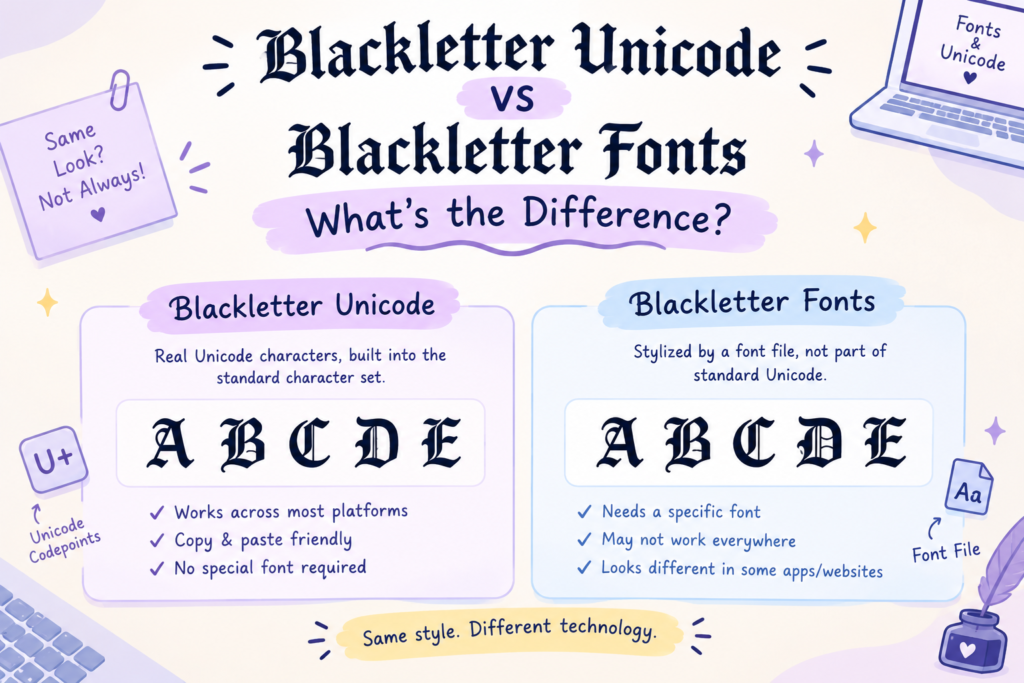
Here’s the easiest way to understand it: a blackletter font changes the appearance of ordinary letters, while blackletter Unicode uses different characters that already have a stylized appearance.
What is a blackletter font?
A blackletter font is a typeface you can use in a supported application. You might download a font file, install it on your computer, and select it in a design program such as Photoshop or Word.
For example, type the word Gothic using a regular font. When you apply a blackletter typeface, the letters take on that medieval look. The underlying text remains the same.
The main advantage? You have more control over the appearance of your text, including its size, color, spacing, and placement.
What is blackletter Unicode?
Blackletter Unicode works differently. Instead of applying a typeface to ordinary letters, a generator replaces them with separate Unicode characters that resemble blackletter lettering.
For example:
- Regular text:
Gothic - Blackletter-style Unicode:
𝔊𝔬𝔱𝔥𝔦𝔠 - Bold blackletter-style Unicode:
𝕲𝖔𝖙𝖍𝖎𝖈
You can copy these characters and paste them into compatible text fields without installing a font.
Keep in mind that these stylized characters are not simply ordinary letters in a different typeface. That distinction matters when it comes to searching, accessibility, text processing, and compatibility.
Blackletter Unicode vs. Blackletter Fonts: A Side-by-Side Comparison
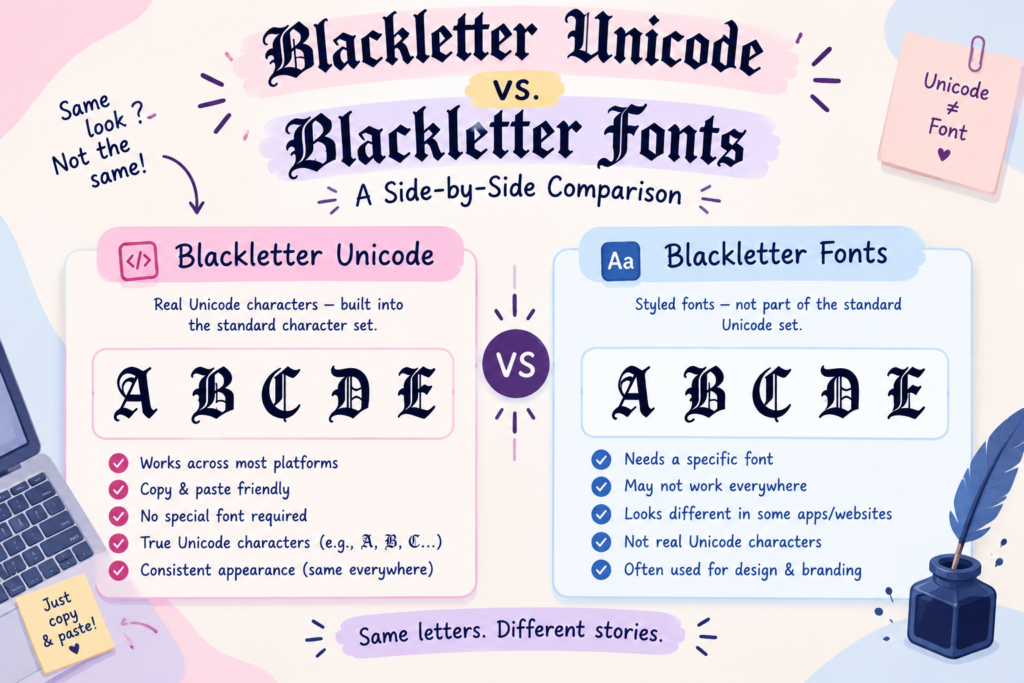
Not sure which option to choose? This table compares the two across the features that matter most.
| Feature | Blackletter Unicode | Blackletter font |
|---|---|---|
| What it is | Special Unicode characters with a blackletter-like appearance | A typeface designed to display text in a blackletter style |
| How it works | Uses encoded characters that you can copy and paste | Changes how supported characters are drawn on screen or in print |
| How to get it | Use a Unicode text generator or character list | Download a font or select one already available in an app |
| Copy-and-paste support | Usually retains its appearance in compatible text fields | Usually loses its special appearance when pasted into an app without that font |
| Download required | Not usually necessary | Often required unless the font is already available or loaded by a website |
| Installation required | No additional font installation for basic use | Often required for desktop design work |
| Where it works | Compatible bios, display names, captions, messages, and other text fields | Design software, documents, websites, and graphics that support the font |
| Platform compatibility | Depends on character support and how the platform handles Unicode | Depends on font availability, embedding, and application support |
| Device compatibility | Some characters may display differently or appear as boxes on certain devices | Appearance depends on whether the font is available or embedded |
| Visual consistency | Can vary across devices and operating systems | More controllable when the same font is available and used correctly |
| Editing flexibility | Can be edited as text, but stylized letters may behave differently from ordinary letters | Ordinary underlying text can usually be edited while retaining the applied font |
| Search and accessibility | Some stylized characters can interfere with searching, screen readers, and text tools | Ordinary text with a decorative font is generally easier to search and process |
| Character limits | May behave differently under platform-specific counting or character restrictions | Usually follows the normal counting rules for the underlying text |
| Design control | Limited control over individual letter shapes, spacing, and layout | Greater control over size, spacing, weight, and placement |
| Best for | Quick copy-and-paste styling | Logos, posters, branding, and other design projects |
| Common uses | Social bios, display names, gaming profiles, and decorative messages | Tattoos, album covers, certificates, invitations, book covers, and logos |
| Typical tone | Edgy, dramatic, mysterious, or alternative | Can feel historic, formal, dramatic, decorative, or edgy |
| Events and occasions | Gothic-themed posts, gaming identities, alternative music profiles, and Halloween content | Gothic weddings, themed invitations, music artwork, fantasy projects, and historical designs |
| Limitations | Inconsistent rendering, character restrictions, and possible accessibility issues | Font availability, installation, compatibility, and licensing |
| Commercial use | Depends on how and where the text is used | Depends on the specific font’s license |
Summary: Choose Unicode when you want stylized text you can copy and paste. Choose a blackletter font when you’re creating a design and need greater control over how the lettering looks.
Why Do Blackletter Unicode Letters Look So Different From Regular Text?
Here’s where things get interesting.
Many blackletter-style text generators use characters from Unicode’s Mathematical Alphanumeric Symbols block. This includes characters such as the Fraktur and bold Fraktur letters.
These symbols were included in Unicode for mathematical and technical notation, but they can also be used to create decorative text.
For example, when you enter A into a generator and get 𝔄 in return, the generator hasn’t simply changed the font applied to the original letter. It has replaced the letter with a different Unicode character.
That means the two characters can look similar while having different underlying identities.
This is also why stylized text can sometimes behave unexpectedly. Search tools, screen readers, and apps that process text may treat these characters differently from ordinary Latin letters.
Blackletter Unicode Examples You Can Copy and Paste
Want to try the style yourself? Here are a few examples to get you started.
Fraktur style
𝔊𝔬𝔱𝔥𝔦𝔠
Bold Fraktur style
𝕲𝖔𝖙𝖍𝖎𝖈
Decorative blackletter-style text
꧁𝕲𝖔𝖙𝖍𝖎𝖈꧂
Lowercase examples
𝖆 𝖇 𝖈 𝖉 𝖊
Uppercase examples
𝔄 𝔅 ℭ 𝔇 𝔈
You can copy these examples directly and try them in compatible text fields. If you want to create your own words or phrases, use our Gothic Font Generator to explore more styles.
Remember that the examples above use Unicode characters, so their appearance may vary slightly depending on the font and device displaying them.
How Do Blackletter Fonts Change the Look of Your Text?
A downloadable blackletter font gives you a different kind of flexibility.
Instead of replacing ordinary letters with special characters, the font tells a compatible application how to draw those letters. You can type a word normally, select the blackletter typeface, and adjust the design to suit your project.
Some blackletter fonts worth exploring include:
- UnifrakturMaguntia: A traditional blackletter style with a strong historical feel.
- UnifrakturCook: A decorative option inspired by historic blackletter lettering.
- Pirata One: A bold display typeface suited to dramatic headings and themed graphics.
These fonts can be useful for posters, logos, invitations, album artwork, and other visual projects. Check each font’s license before using it commercially.
The main limitation is that a font’s appearance doesn’t automatically travel with your text. If you copy a word into another application that doesn’t have the font, it may appear in a different typeface.
For example, a word that looks beautifully Gothic in your design software may look completely ordinary when pasted into a plain text field.
Why Can You Use Blackletter Unicode on Social Media Without Installing a Font?
Unicode characters are part of the text itself. That’s what makes them useful for quick styling.
When you paste a blackletter-style character into a compatible social media field, the platform attempts to display that character using the fonts available on the viewer’s device. You don’t have to install the original font used by a text generator.
This can make Unicode useful for:
- Instagram bios and display names
- TikTok bios and captions
- Discord profiles and messages
- Gaming display names
- Decorative posts and short messages
However, Unicode doesn’t guarantee that every platform will accept or display every character. Some services restrict certain characters, and some devices may not have the necessary glyphs.
So, while copy-and-paste styling is convenient, it’s worth checking your text after pasting it.
Where Do Blackletter Unicode and Gothic Fonts Work Best?
Both options can give your text a distinctive appearance, but they serve different purposes.
Best uses for blackletter Unicode
Unicode is a convenient choice when you want to style text quickly without installing anything. It works particularly well for short pieces of decorative text.
You might use it for:
- Instagram bios and display names
- Gaming profile names, where permitted
- Discord display names and messages
- TikTok bios and social media captions
- Short aesthetic phrases and decorative text
Best uses for downloadable blackletter fonts
A font is generally the better option when you’re building a design and need more control over the final result.
Common examples include:
- Band logos and music artwork
- Tattoo lettering references
- Posters and event invitations
- Certificates and formal documents
- Book covers and historical designs
- Brand identities and decorative headings
A simple rule to remember: For text you want to copy and paste, start with Unicode. For a design you want to control carefully, start with a font.
Why Does Blackletter Unicode Sometimes Show Up as Boxes (□)? Or Broken on Devices?
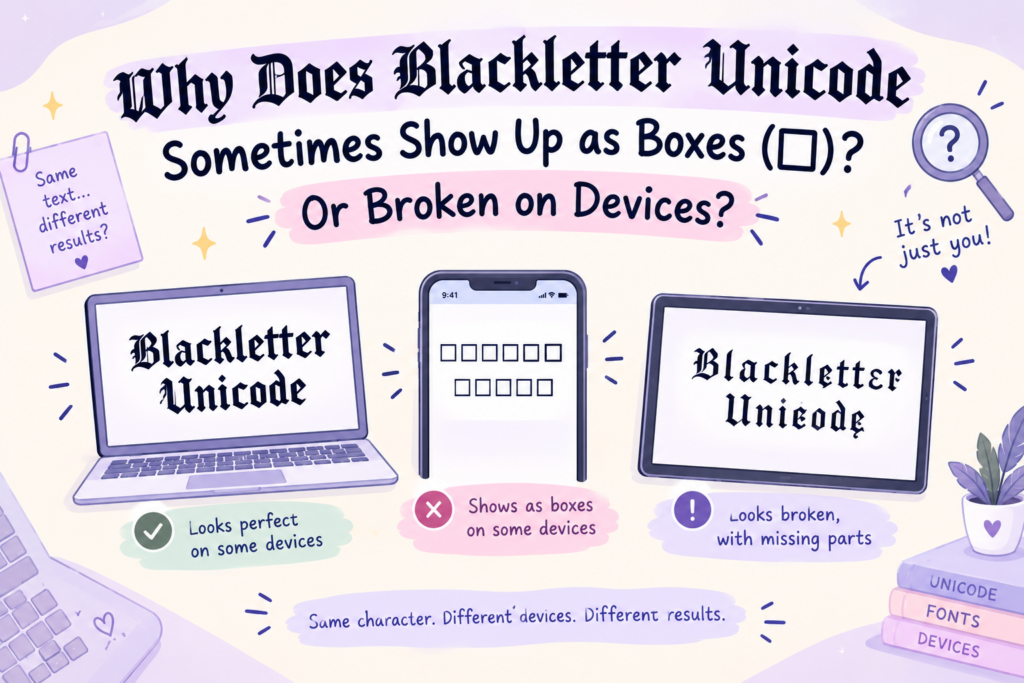
Have you ever copied fancy text only to find that some letters appear as empty squares? This usually means the device or application doesn’t have a glyph available for one or more characters.
A Unicode character can exist in the standard without being supported by every font. If the software cannot find a suitable glyph, it may display a box or another replacement symbol.
Other issues can arise when a platform filters certain characters or handles text differently.
If your blackletter text looks broken, try these steps:
- Open the text on another modern device or browser.
- Test a different blackletter style with more widely supported characters.
- Remove decorative symbols one at a time to identify the character causing the issue.
- If the text is for a graphic, use a blackletter font in your design software instead.
Modern devices often support many of these characters, but compatibility isn’t universal. Always test your text on the platform where you plan to use it.
Can You Use Blackletter Unicode in Instagram Bios, Usernames, and Gaming Profiles?
Often, yes. It depends on the platform and the specific field.
Blackletter Unicode may work in bios, display names, and captions. The actual @username field has stricter character rules, so decorative Unicode letters generally aren’t suitable there.
Gaming profiles
Some games allow stylized Unicode in display names, while others restrict certain characters. Roblox, PUBG, and Free Fire may handle names differently, so check the game’s current rules and test your text before using it.
Discord
Unicode styling may work in display names, server names, and messages, subject to Discord’s current character rules and restrictions.
TikTok, Facebook, and other social platforms
You can often use decorative Unicode in supported text fields, such as bios or posts. Availability varies by field, and some characters may be rejected or displayed differently.
Note: A display name is not necessarily the same as an account handle or username. A platform may allow decorative characters in one while requiring more restricted characters in the other.
Blackletter Unicode vs. Fonts: Which One Should You Choose?
The best option depends on what you’re trying to create.
Choose blackletter Unicode if:
- You want a quick Gothic look without installing anything.
- You’re styling a short bio, caption, or display name.
- You want to copy and paste your text into a compatible field.
- You don’t need precise control over letter spacing or layout.
Choose a blackletter font if:
- You’re designing a logo, poster, or invitation.
- You need control over typography, spacing, and placement.
- You want to adjust text size and color within a design application.
- You need predictable results in a document or print project.
Neither option is universally better. Unicode is convenient for short decorative text, while fonts offer greater design control. If you’re styling a social profile, Unicode is often the easiest starting point. If you’re creating a polished graphic, a blackletter font is usually the more flexible choice.
How to Copy, Paste, Download, and Use Blackletter Styles
Getting started is simple. Follow the method that matches your needs.
Option 1: Create blackletter Unicode text
- Open our Gothic Font Generator.
- Enter the word, name, or phrase you want to style.
- Choose a blackletter or Fraktur-inspired style.
- Copy the generated text.
- Paste it into a compatible bio, display name, caption, or message.
- Check that the text displays correctly before saving.
No separate font download is needed for basic Unicode copy-and-paste use.
Option 2: Download and use a blackletter font
- Browse a reputable font source, such as Google Fonts.
- Find a blackletter typeface that suits your project.
- Check its license, especially if the design is for commercial use.
- Download and install the font if your application requires it.
- Open a supported design program, such as Canva, Photoshop, or Word, and select the typeface if available.
- Adjust the size, color, spacing, and placement to finish your design.
Some applications provide fonts through built-in libraries or web-based tools, so downloading and installing a file isn’t always necessary.
Frequently Asked Questions
What are the different types of blackletter fonts?
The main historical styles are Textura (dense, angular — like the Gutenberg Bible), Fraktur (German, with curves), Schwabacher, and Rotunda (rounder). Most “Old English” fonts are Textura-style, and Unicode blackletter is Fraktur-based.
What is a Unicode font?
The phrase “Unicode font” can be confusing. A Unicode-compatible font is a typeface that contains glyphs for Unicode characters. However, what people call a “Unicode font generator” often converts ordinary text into special Unicode characters that resemble different lettering styles. These are two different things.
Is blackletter the same as gothic?
Mostly yes, “Gothic” often refers to blackletter script. But “Gothic” is confusingly also used for some sans-serif fonts (like “News Gothic”). In the blackletter/medieval context, Gothic = blackletter.
What is blackletter font used for?
Blackletter is commonly used in tattoos, music logos, posters, gaming profiles, certificates, book covers, and other designs that call for a historic, dramatic, or Gothic look.
Can I use blackletter in my Instagram username?
Blackletter Unicode may work in your display name or bio, but the actual @username handle has stricter rules. Check Instagram’s current requirements before trying to use special characters in your handle.
Why does my blackletter text show as boxes?
This usually happens because the device or application lacks a glyph for the character. Try another device, a different style, or a conventional blackletter font in a design application.
Is blackletter Unicode free?
You can generally copy and paste Unicode characters without paying for a font or installing anything. A text generator may also be free to use. Downloadable font files have their own licensing terms, so check the license before using one commercially.
The Bottom Line
Blackletter Unicode and blackletter fonts can create a similar Gothic appearance, but they work in different ways.
Unicode is best for quick copy-and-paste styling in compatible bios, display names, captions, and messages. Blackletter fonts are better for design projects where you need control over the shape, size, spacing, and placement of your lettering.
If you want to experiment with Gothic text right away, try our Gothic Font Generator and create a style you can copy and paste into compatible text fields.