
How to Find the Unicode Character Behind Fancy Text? And How to Read Codes?
Introduction
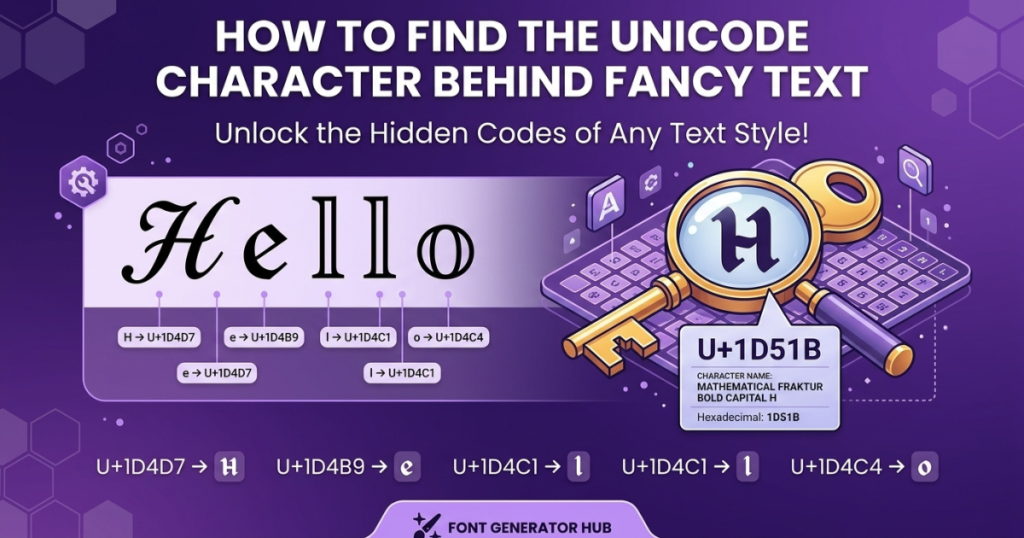
Ever wondered what’s actually behind a piece of fancy text like 𝓯𝓪𝓷𝓬𝔂 or 𝔊𝔬𝔱𝔥𝔦𝔠? Those styled letters aren’t a special font — they’re Unicode characters, each with a unique code you can look up. Finding that code (called a “code point”) tells you exactly which character you’re dealing with, which is useful for troubleshooting boxes, checking if text was altered, understanding how generators work, or inspecting a username.
This guide shows you the simple step-by-step method to find the Unicode behind any fancy text, how to read the codes, free ways to do it with no special software, and the key concepts (code points, glyphs) explained in plain language.
Did you know some Unicode characters look identical to normal letters but aren’t? See the Unicode characters that look like Latin letters but aren’t — and how to spot them.
What Is Behind Fancy Text?
When you see fancy text, you’re almost always looking at Unicode characters, not a font. Here’s the distinction:
- A font is a design applied to standard letters — the character “a” stays “a” underneath; only its look changes.
- Fancy Unicode text uses different characters entirely — “a” is swapped for “𝓪,” which is a separate character in the Unicode system that happens to look like a cursive a.
So a fancy-looking letter is still a character — just an unusual one. A quick example:
- Normal: a (the character “a,” code U+0061)
- Fancy: 𝓪 (a completely different character, code U+1D4EA, named “Mathematical Bold Script Small A”)
Same visual idea, entirely different underlying character. That’s why you can look it up. (For the full “how this works” picture, see how fancy fonts work.)
How Fancy Text Generators Work
A fancy text generator takes your ordinary letters and maps each one to a different Unicode character in the chosen style. Type “cat,” pick bold script, and it outputs 𝓬𝓪𝓽 — three different Unicode characters that look like a styled “cat.”
Most copy-paste “fonts” are real Unicode characters (that’s why they paste and travel). A few effects use combining marks stacked on normal letters (like zalgo). Either way, when you copy and paste the result, you’re copying characters — which is exactly why you can inspect them and find their code points.
Planning to use styled text online? See where Unicode fonts work on Instagram, Facebook, and TikTok.
How to Find the Unicode Character Behind Fancy Text
The actual process, step by step:
Step 1: Copy the Fancy Text
Select and copy the fancy character or phrase you want to inspect (from a bio, a username, a message — anywhere).
Step 2: Paste It Into a Unicode Character Inspector
Paste it into any Unicode lookup/inspector tool (several free browser-based ones exist — search “Unicode character inspector” or “Unicode code point finder”). These read the text and break it into individual characters.
Step 3: Identify the Unicode Code Point
The inspector shows each character’s code point — a value like U+1D4EA. This is the unique number Unicode assigns to that exact character.
Step 4: Check the Character’s Unicode Name
Each code point has an official name, like “MATHEMATICAL BOLD SCRIPT SMALL A.” The name identifies the character (note: it describes the character, not necessarily how it looks — more on that below).
Step 5: Compare It With the Original Character
Compare the fancy character’s code point to the normal letter’s (e.g., 𝓪 = U+1D4EA vs a = U+0061). Different code points confirm it’s a different character, not just restyled text. This is how you verify what you’re actually looking at.
What Is a Unicode Code Point?
A code point is the unique number Unicode assigns to every character. It’s written in the format U+ followed by a hexadecimal number — for example:
U+0041= A (Latin capital A)U+0061= a (Latin small a)U+1D400= 𝐀 (Mathematical Bold Capital A)
The code point identifies the character — it’s the character’s permanent ID in the Unicode standard, no matter what device or font displays it.
Code point vs character vs glyph (the three you’ll hear):
- Character = the abstract text unit (the letter “a”)
- Code point = its Unicode number (U+0061)
- Glyph = the visual shape a font draws for it (the actual picture of “a” you see)
One character (one code point) can have many glyphs — because different fonts draw it differently.
How to Read a Unicode Character Code
Codes look like U+0041, U+0061, or U+1D400. Breaking that down:
U+— signals “this is a Unicode code point”- The number after it — a hexadecimal (base-16) value. Hex uses 0–9 then A–F, so it can go higher than decimal in the same space.
So U+0041 is hex 41 (decimal 65) = “A.” U+1D400 is a much higher value in the “Mathematical Alphanumeric Symbols” range, which is where most bold/script/gothic fancy letters live. You don’t need to do the math — the code just needs to be read as “U+ then a hex ID.”
How to Find Unicode Characters Without Special Software
You don’t need to install anything. Practical methods:
- Browser-based Unicode lookup tools — paste text into a free online inspector; it lists every character’s code point and name.
- Operating-system character utilities — Windows has “Character Map”; macOS has the “Character Viewer” (Emoji & Symbols). Both show character details.
- Developer / browser tools — in a browser, you can inspect text or use the console to reveal code points (e.g., a character’s
codePointAtvalue). - Copy-and-paste lookup — many “Unicode inspector” pages just need you to paste the text; no download, no signup.
The point: several free routes exist, so don’t rely on any single third-party tool — pick whichever is handy.
How to Identify Every Character in a Fancy Text String
A fancy phrase often mixes several character types. Inspecting the whole string reveals this:
| Character | Code point | Unicode name |
|---|---|---|
| A | U+0041 | LATIN CAPITAL LETTER A |
| a | U+0061 | LATIN SMALL LETTER A |
| 𝐀 | U+1D400 | MATHEMATICAL BOLD CAPITAL A |
| 𝓪 | U+1D4EA | MATHEMATICAL BOLD SCRIPT SMALL A |
| ꧁ | U+A9C1 | (decorative bracket) |
| (space) | U+0020 | SPACE |
A single fancy word can contain a mix of ordinary letters, mathematical alphanumeric symbols, punctuation, spaces, and decorative characters — which is why inspecting each character (not just eyeballing the word) tells you what’s really there.
Unicode Character vs Glyph: What’s the Difference?
An important technical distinction people miss:
- Character = the encoded text unit
- Code point = the Unicode number for that character
- Glyph = the visual shape a font draws
The same character (same code point) can look different because different fonts draw different glyphs for it. That’s why the same Unicode text can look different on different devices — the character is identical; the glyph (font drawing) changes.
Why Fancy Unicode Text Looks Like a Font
People call it a “font” because it looks styled — but it isn’t changing the font at all:
| Fancy Unicode Text | Actual Font |
|---|---|
| Uses different Unicode characters | Uses the same underlying characters |
| Can usually be copied as text | Requires the font to be available |
| The character itself is different | The character stays the same |
| Look depends on the character + font support | Look is controlled by the font |
So “fancy fonts” is a convenient nickname, but technically you’re inserting different characters, not applying a font.
How to Tell Whether Text Uses Unicode or an Actual Font
Practical clues:
- Can you copy it as individual characters? → Unicode.
- Does it stay stylized when pasted elsewhere? → Unicode (a real font would revert).
- Does it require a font file to display? → an actual font.
- Does a Unicode inspector show different characters? → Unicode.
Honest caveat: appearance alone isn’t always enough to tell. Inspecting the code points is the reliable way — if the characters differ from normal letters, it’s Unicode.
Why Some Fancy Characters Have Unexpected Unicode Names
Here’s a detail most articles skip: Unicode names identify the character, not its visual style. So a bold-looking fancy letter often has a name starting with “MATHEMATICAL” — because those styled letter sets were originally added to Unicode for math notation, not for “fancy fonts.”
For example, 𝐀 (a bold-looking A) is officially “MATHEMATICAL BOLD CAPITAL A” — not “Bold Font A.” The name reflects its origin in math typesetting, even though people now use it as a bold font. So don’t be surprised when a fancy character’s Unicode name says “mathematical” — that’s expected.
Why Some Fancy Characters Don’t Work Everywhere
When you find a character’s code point, you can also understand why it sometimes fails:
- Font support — the viewing device needs a font that can draw that code point
- Missing glyphs — no drawing = a box (□)
- Unsupported characters — older systems may not know newer code points
- Older software — weaker Unicode support
- Platform restrictions — some apps filter non-standard characters
If a character shows as a box or replacement symbol, it’s a font/support gap, not a wrong code point. (Full detail: why fancy text shows as boxes.)
Why the Same Unicode Character Can Look Different on Different Devices
Because Unicode identifies the character, but fonts and rendering systems draw it — and those differ across operating systems, browsers, and apps. Same code point, different glyph, different look. (For a script-specific deep dive, see why Arabic Unicode looks different on different devices.)
Can You Convert Fancy Unicode Text Back to Normal?
Sometimes:
- When it’s straightforward — if a fancy character has a direct normal-letter equivalent (𝓪 → a), a converter can map it back.
- When it’s not — decorative symbols, frames, or combining marks may have no simple normal equivalent, so they’re dropped or can’t be converted.
- Why reverse conversion can lose information — if the fancy text mixed in symbols or spacing characters, converting to plain text discards those, so you don’t always get the exact original back.
For plain letters, reverse conversion is easy; for decorated text, expect some loss.
How to Identify Unicode Characters in a Fancy Username
A practical use case — inspecting a username:
- Copy the username.
- Inspect each character in a Unicode tool.
- Record the code points.
- Identify unusual symbols (the decorative or rare ones).
- Check whether those characters are supported by the platform you want to use it on.
This tells you why a fancy username might show boxes for some people (rare code points) or get rejected by a game (filtered characters).
Common Problems When Identifying Fancy Unicode Text
| Problem | Possible reason |
|---|---|
| Character isn’t recognized | The tool may not support that character |
| Shows as a square (□) | Missing font/glyph |
| Several characters look identical | Different Unicode characters can look alike |
| Fancy text contains normal letters too | The generator mixed character types |
| Copy/paste gives different results | App or platform processing |
| Character name seems unrelated to its look | Unicode names identify characters, not styles |
Common Unicode Mistakes to Avoid
- Assuming every fancy-looking text uses a font (usually it’s Unicode characters)
- Assuming two visually identical characters are the same Unicode character (they can differ)
- Confusing code points with glyphs
- Assuming one Unicode character looks identical everywhere (glyphs vary by font)
- Using obscure characters without checking compatibility first
Frequently Asked Questions
How can I find the Unicode value of a character?
Copy the character, paste it into a Unicode inspector (or use your OS’s Character Map/Viewer), and it shows the code point (like U+1D400) and name.
How do I find the Unicode code point of fancy text?
Paste the fancy text into a Unicode inspector — it breaks the text into each character and lists every code point.
What does U+ mean in Unicode?
“U+” signals a Unicode code point, followed by a hexadecimal number identifying the character (e.g., U+0041 = A).
Are fancy fonts actually Unicode characters?
Yes — most copy-paste fancy “fonts” are different Unicode characters that look styled, not installed fonts.
How do I identify a Unicode character by its appearance?
Copy it into an inspector; identifying purely by look is unreliable since different characters can look similar. The code point is the definitive ID.
Can two different Unicode characters look the same?
Yes — different code points can have near-identical glyphs (a known source of confusion and even security “lookalike” tricks).
Can I convert Unicode fancy text back to normal text?
Often yes for plain-styled letters; decorative symbols and combining marks may not convert cleanly and can be lost.
Why does a Unicode character appear as a square?
The font lacks a glyph for that code point (a “missing glyph”). Try another font, app, or device.
What is this symbol █ or ☐?
█ is a “full block” and ☐ an empty box — often shown as fallbacks when a character can’t be rendered, though both are also real symbols. If they appear where other text should be, it’s a missing-glyph fallback.
Why does fancy text look different on another device?
Different devices draw the same code point with different fonts (glyphs), so the look changes while the character stays the same.
Can I find the Unicode code point of an entire sentence?
Yes — a Unicode inspector lists the code point for every character in the whole string, not just one.
Quick Guide: Find the Unicode Behind Fancy Text
Copy → Inspect → Find code point → Check Unicode name → Compare with the original → Test compatibility.
Conclusion
Fancy text is built from Unicode characters, each with a code point (like U+1D4EA) that identifies it — separate from the glyph a font draws and from the font itself. Finding those code points lets you understand exactly what you’re looking at: whether text is Unicode or a real font, why a character shows as a box, whether a username will work on a platform, and how a generator built the styling. Copy the text, run it through any free Unicode inspector, read the code points, and you’ll know precisely what’s behind the fancy look.
Want to create fancy text? Try our Fancy Fonts Generator.