The Ultimate Discord Bio Formatting Guide: Markdown Tricks, Fancy Text, and Creative Ideas
Introduction
A well-formatted Discord bio helps your profile show your personality at a glance. You can create a clean, aesthetic, funny, or gaming-inspired bio using decorative Unicode text, symbols, and simple spacing. You don’t need design skills; just choose a style, copy the text, and paste it into your profile.
Just remember the formatting tricks that work in Discord messages or About Me bios.
Let’s learn them in detail.
How to Format Your Discord Bio for a Cleaner, More Noticeable Profile
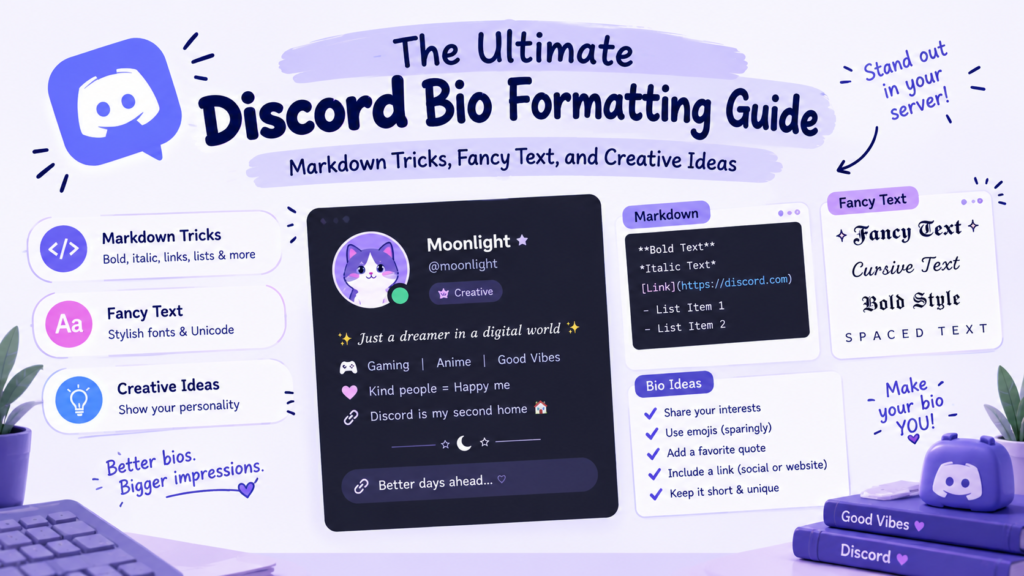
Discord’s About Me field does not support the same Markdown formatting as chat messages. Typing **bold** into your bio won’t automatically make the text bold. Instead, you can use decorative Unicode characters that already have a styled appearance.
For a good-looking bio, focus on three things:
- Decorative text: Choose bold, cursive, gothic, or small-cap styles.
- Simple symbols: Add stars, hearts, or dots for a personal touch.
- Clean spacing: Keep your text organized and easy to read.
A few thoughtful choices usually look better than filling every line with fancy characters.
Discord Markdown vs. Fancy Text: What’s the Difference?
Markdown and decorative Unicode text may look similar, but they work differently:
| Feature | Discord Markdown | Fancy Unicode Text |
|---|---|---|
| How it works | Uses symbols to format supported messages | Uses special characters that already look styled |
| Example | **Hello** → Hello | 𝗛𝗲𝗹𝗹𝗼 |
| Works in chat messages | Yes, for supported formatting | Yes, when the characters are supported |
| Works in About Me bio | Markdown syntax isn’t rendered as formatting | Yes, decorative characters can be pasted |
| Common styles | Bold, italics, underline, strikethrough, headings | Bold-style, cursive, gothic, small caps |
| Requires a generator? | No | Optional, but useful for finding styles quickly |
| Display compatibility | Depends on Discord’s supported Markdown features | Depends on device and font support |
| Best for | Formatting messages, guides, and announcements | Styling bios, display names, and other text fields |
Use Markdown to format supported Discord messages, and fancy Unicode text to give your bio a decorative look. Unicode styles aren’t actual font changes, so some characters may display differently across devices.
Discord Markdown Tricks to Make Your Messages Stand Out
Markdown is useful when you want to organize messages, emphasize important details, or make server announcements easier to read. These examples apply to supported Discord messages, not the About Me bio.
How to Make Discord Text Bold
Place two asterisks on each side of your text:
**Hello everyone** → Hello everyone
Use bold text for important details, reminders, or short announcements.
How to Strikethrough Text on Discord (and on Mobile)
Place two tildes on each side:
~~Old message~~ → Old message
This is useful for showing corrections, crossed-out ideas, or playful comments. You can type the same syntax on desktop and mobile.
How to Make Text “Big” on Discord (and Mobile)
Discord supports headings in messages. Start a line with a hash symbol followed by a space:
# Main heading## Smaller heading### Small heading
These headings can help organize longer messages, guides, and announcements. They don’t turn your About Me bio into formatted text.
How to Italicize or Underline Text
Use these Markdown patterns in supported messages:
- Italics:
*your text*or_your text_ - Underline:
__your text__
Use these styles sparingly to highlight a word or short phrase.
How to Combine Formatting Styles
You can combine supported Markdown styles to emphasize text:
***Bold and italic***__**Bold and underlined**__~~**Bold and crossed out**~~
Check the result in Discord before sending if you’re combining several styles.
How to Use Line Breaks and Symbols
On desktop, press Shift + Enter to start a new line without sending your message. You can also use symbols such as ·, —, ★, and ✦ to separate information.
Short paragraphs and clear spacing make longer messages easier to follow.
How to Add Fancy Fonts and Decorative Text to Your Discord Bio
For a styled Discord bio, decorative Unicode text is one of the simplest options. You can choose a style that matches your personality and paste it into your About Me field.
Bold, Cursive, and Gothic Text Styles
Here are three styles you can try:
- Bold: 𝗬𝗼𝘂𝗿 𝗡𝗮𝗺𝗲
- Cursive: 𝓨𝓸𝓾𝓻 𝓝𝓪𝓶𝓮
- Gothic: 𝔜𝔬𝔲𝔯 𝔑𝔞𝔪𝔢
To create your own, enter your text into our Discord font generator, choose a style, copy the result, and paste it into your About Me field.
Small Caps, Wide Text, and Aesthetic Styles
If you prefer a softer or more minimal look, try these examples:
- Small caps: ʏᴏᴜʀ ɴᴀᴍᴇ
- Wide text: Your Name
Small caps can give your bio a neat appearance, while wide text creates a more spaced-out style. Keep in mind that wide characters may take up more room.
Add Symbols, Stars, and Simple Decorations
Symbols can make your bio feel more personal without adding extra words. Try stars, hearts, dots, or brackets:
♡ gamer · artist · night owl ♡
Other options include ★, ✦, ⋆, ꒰ ꒱, and ·˚.
Choose a few that suit your style rather than adding every symbol you like.
5 Discord Bio Formatting Ideas You Can Copy and Customize
Need inspiration? Try one of these ready-to-use examples and change the wording to match your personality.
1. Minimalist and Clean
ᴊᴜꜱᴛ ʜᴇʀᴇ ᴛᴏ ᴠɪʙᴇ
gamer · chill · he/him
2. Soft and Aesthetic
⋆。˚ 𝓼𝓸𝓯𝓽 𝓼𝓸𝓾𝓵 ˚。⋆
✿ art · music · daydreams ✿
3. Dark and Mysterious
𝖑𝖚𝖗𝖐𝖎𝖓𝖌 𝖎𝖓 𝖙𝖍𝖊 𝖘𝖍𝖆𝖉𝖔𝖜𝖘 🖤
online but never really here
4. Gamer and Server Regular
𝗚𝗚 𝗘𝗭 🎮
ranked grinder · always in VC · ping me
5. Funny and Personality-Driven
ᴘʀᴏꜰᴇꜱꜱɪᴏɴᴀʟ ʟᴜʀᴋᴇʀ
here for the memes, staying for the chaos 😂
These are not fixed templates. Swap the words, change the symbols, or combine styles to create something that feels like you.
How to Make Your Discord Profile Easier to Recognize in Busy Servers
A distinctive Discord profile doesn’t need complicated formatting. A consistent style and a memorable detail can make it easier for other members to recognize you.
- Choose a consistent look: Use a similar style across your display name and bio.
- Add a signature symbol: A star, heart, or other simple character can become part of your personal style.
- Keep the text readable: Decorative characters shouldn’t make your name or bio difficult to understand.
- Match your overall theme: A minimalist bio might suit simple symbols, while a gaming profile might use bold text and game-related details.
The goal is to create a profile that feels recognizable, not to use as many effects as possible. Bio formatting also doesn’t guarantee better visibility in Discord’s server search.
Common Discord Bio Formatting Mistakes to Avoid
A few small mistakes can make a styled bio harder to read. Here’s what to watch for.
Using Too Many Symbols and Fonts
Combining several decorative styles, emojis, and symbols can make your bio look cluttered. Choose one main text style and add one or two decorative details.
Choosing Text That’s Hard to Read
Gothic and heavily stylized characters may look attractive, but they can be harder to read at a glance. Keep important details in a simple style so other members can understand your bio quickly.
Using Unicode Characters That May Not Display Correctly
Some decorative characters may appear as empty boxes or unusual symbols on certain devices. This happens when a device or font doesn’t support the characters.
Test your bio after saving it, and prefer common, readable styles if you want it to display more reliably across devices.
How to Add or Edit Your Discord About Me Bio
You can update your Discord bio directly in your profile.
- Open Discord and go to User Settings on desktop, or tap your avatar on mobile.
- Open your profile settings and select Edit Profile.
- Find the About Me field.
- Type your bio or paste your chosen decorative text.
- Save your changes and check how the bio appears on your profile.
If you need a styled version of your text, use our Discord font generator before pasting it into the field.
Discord’s interface may look slightly different depending on your device and app version.
Frequently Asked Questions
Can you use Markdown in a Discord bio?
In short, No. Discord’s About Me field does not support the same Markdown formatting used in messages. To create a decorative bio, use copy-and-paste Unicode text instead.
How do you make your Discord bio text bold?
Since Markdown doesn’t work in the bio, use bold-style Unicode characters. You can generate them with a Discord font generator and paste the result into your bio.
Can you use fancy fonts in a Discord bio?
Yes, fancy Unicode text (bold, cursive, gothic, small caps) works perfectly in your bio. You can copy-paste many decorative text styles into your About Me field. However, some characters may display differently depending on device and font support.
Why does some decorative text appear as boxes?
The device or font displaying your bio may not support those Unicode characters. Try a more common text style and check the result on another device. Use widely-supported styles (bold, cursive, small caps) to avoid boxes.
How long can a Discord bio be?
Discord’s About Me field has a character limit. It can be up to 190 characters (check the current character limit before finalizing your bio), especially if you’re using decorative characters. And remember fancy characters can count as more than they look.
Do fancy fonts work on every device?
Yes, common font styles such as bold, cursive, or small caps display on modern devices, but support varies. Very rare decorative characters may appear differently or show as boxes on older versions. So, stick to the common font styles for reliability.
Final Tips for Creating a Discord Bio That Feels Like You
The best Discord bio is one that reflects your personality and remains easy to read. Pick a style that matches your vibe (soft, dark, funny, minimal), add a short line about yourself, keep it readable, and don’t overdo the symbols.
Remember the main difference: Markdown formats support Discord messages, while decorative Unicode text can help style your bio.
Ready to try a new look? Use our Discord font generator, copy your favorite style, and personalize your About Me section.