
Can Unicode Fonts Be Used on Instagram, Facebook & TikTok?
Introduction
Yes — Unicode fonts work on Instagram, Facebook, and TikTok. You can paste fancy text into your bio, captions, comments, and (on Facebook) posts on all three platforms. They work because Unicode fonts aren’t really “fonts” — they’re special text characters that these apps read as normal text. The one limit: your actual @username usually requires plain letters, so fancy text goes in your display name and bio, not the login handle.
This guide covers exactly where they work on each platform, on both iPhone and Android, and how to use them.
What Are Unicode Fonts (Briefly)?
Unicode fonts are stylish text characters — bold, cursive, gothic, and more — that you copy and paste. They’re not installed fonts; they’re different Unicode characters that already look styled (like 𝓯𝓪𝓷𝓬𝔂 instead of fancy). Because they’re standard text, they paste into apps and display for everyone without any download. (For the full explanation, see how fancy fonts work.)
That’s the key reason they work on social media: the app doesn’t need to “support fancy fonts” — it just needs to accept text, which it already does.
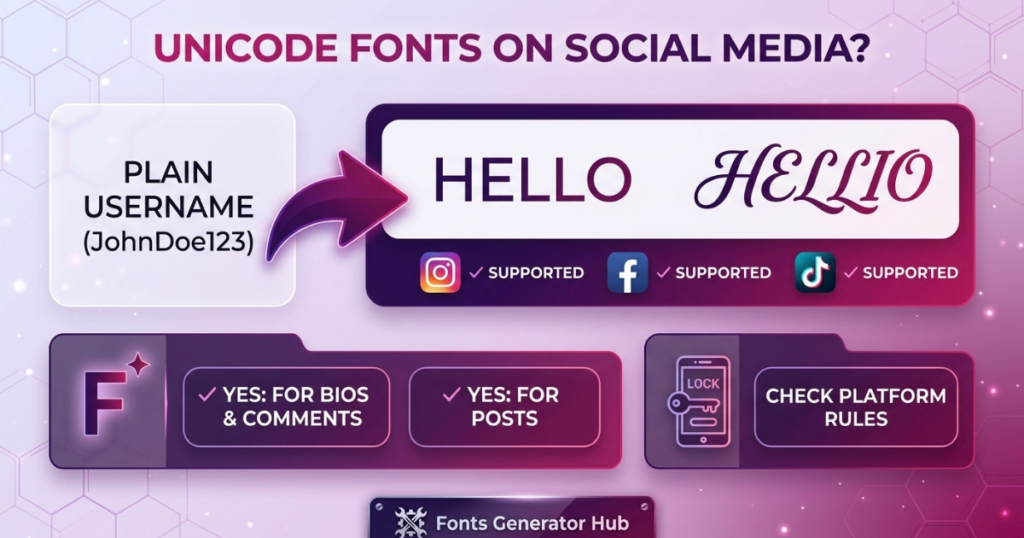
Unicode Text vs Regular Fonts on Social Media
Unicode text and actual fonts get confused because both change how text looks — but they’re different technologies:
| Feature | Unicode Text | Regular Font |
|---|---|---|
| Can be copied and pasted | Yes | Usually not as a font style |
| Requires font installation | No | Usually requires the font to be available |
| Changes the underlying characters | Often | No |
| Can be used in ordinary text fields | Often | Usually not directly |
| Visual consistency | Can vary | More controllable |
| Useful for bios / usernames | Where supported | Usually not directly |
| Useful for graphic design | Limited | Yes |
| Requires platform font support | Character support matters | Font must be loaded/installed |
For example, if you make a graphic in Canva with a decorative font, that font controls the appearance. If you make fancy Unicode text, you’re copying characters you can paste into a text field. Different technologies — similar-looking results.
Want the specifics on handles vs display names? See our guide on using Unicode text in usernames.
Can You Use Unicode Fonts on Instagram?
Yes. Instagram fully supports Unicode text, and since Instagram has no built-in font options of its own, pasting Unicode is the only way to style your text there. It works in:
- Bio — the most popular use (150-character limit, so shorter styled phrases fit best)
- Name field — the bold name under your profile photo
- Captions — style a word or line in a post caption
- Comments — styled text works in comments too
- Story text — you can paste fancy text into story text boxes
Where it doesn’t work on Instagram: your @username (the handle) allows only letters, numbers, periods, and underscores — no fancy text there. Style your display name and bio instead.
Focusing on Instagram? Here’s a full guide to the best fonts for your Instagram bio and how to use them.
Can You Use Unicode Fonts on Facebook?
Yes. Facebook supports Unicode across:
- Posts — style text in status updates
- Bio / intro — your profile bio
- Comments — styled replies
- Page names & descriptions — for business/creator pages
- Your name — within Facebook’s name rules (Facebook has a “real name” policy, so heavy styling on your personal name may be flagged; it’s safer in posts and bios)
Facebook has no native text formatting either, so Unicode is how you add bold or cursive to a post. Just note the real-name policy if styling your actual profile name. See the Facebook font generator.
Can You Use Unicode Fonts on TikTok?
Yes. TikTok supports Unicode in:
- Bio — the main use (short character limit, so keep it tight)
- Captions — style text on your videos’ captions
- Comments — styled comments work
- Display name — the name shown on your profile
Where it doesn’t work on TikTok: the @username handle needs plain characters. And note — TikTok’s on-video text tool (the text you add onto a video while editing) uses TikTok’s own built-in fonts, which is separate from pasted Unicode; Unicode goes in the bio/caption/comments, while the on-screen video text uses TikTok’s editor fonts. See the TikTok font generator.
Where Can You Use Unicode Text? (Quick Reference)
Unicode stylized text works in many social media areas, but exact support varies by platform and text field:
| Platform | Common uses |
|---|---|
| Bios, captions, comments, names, messages | |
| Posts, comments, profile text, messages | |
| TikTok | Bios, captions, comments, names |
This doesn’t mean every Unicode character works in every location — platform rules, character restrictions, and device support all affect the result. When in doubt, test in the exact field before saving.
What Font Does TikTok Use?
TikTok’s app interface uses its own system fonts (Proxima Nova and platform defaults), and its video text editor offers a set of built-in fonts (classic, bold, handwriting, typewriter, etc.) you choose from within the app when adding text to a video. Those built-in editor fonts are different from copy-paste Unicode: the editor fonts style text on your video, while Unicode fancy text goes in your bio, caption, and comments. So “TikTok fonts” can mean either — the in-app video fonts, or copy-paste Unicode for your bio.
Do Unicode Fonts Work on iPhone (iOS) and Android?
Yes — on both. Unicode is built into iOS and Android, so:
- You can copy fancy text from a generator in your phone’s browser
- Paste it into any app (Instagram, Facebook, TikTok) on either platform
- It displays for viewers on both iPhone and Android
No special keyboard or app is needed on either. One honest note: the same fancy character may look slightly different on iPhone vs Android (each draws it with its own fonts), and very rare decorative characters can show as a box on older devices — but the common styles (bold, cursive, italic, small caps) display reliably across both.
Where Unicode Fonts DON’T Work
Being honest about the limits saves frustration:
- @Usernames / handles — Instagram, TikTok, and most platforms require plain letters, numbers, and underscores for the unique @handle. Fancy text works in your display name and bio, not the handle.
- Some search/tag fields — hashtags and searchable fields usually need plain text.
- Facebook’s real name — heavy styling on your personal profile name may be flagged by the name policy (fine in posts/bios).
- Rarely, older apps — a few apps strip non-standard characters, though Instagram/Facebook/TikTok all support Unicode well.
How to Use Unicode Fonts on Social Media
- Open a font generator and type your text.
- Pick a style — bold, cursive, aesthetic, etc.
- Copy it.
- Paste it into the app’s bio, caption, comment, or post.
That’s it — same process on iPhone and Android, no app needed. Keep styled text short (a bio line, a name) for the cleanest look. Try the Social Media Fonts hub for platform-specific tools, or the fancy font generator for general styling.
How to Convert Unicode Characters Back to Normal Text
Sometimes you need plain text back (for a username, a search, or to remove styling):
- For styled letters (𝓪 → a): a Unicode-to-text converter can map most fancy letters back to normal ones automatically.
- For decorative symbols (frames, marks): those often have no plain equivalent, so they’re simply removed when converting to normal text.
- The simplest manual fix: retype the text normally, or paste it into a plain-text editor (like Notepad), which sometimes strips styling.
So converting fancy letters back is usually easy; decorative extras just drop out. (Curious how the original conversion works? See how to find the Unicode behind fancy text.)
Native Formatting vs Unicode Fonts on These Platforms
Worth knowing: Instagram, Facebook, and TikTok have NO native text formatting — no built-in bold, italic, or font buttons for your bio or posts. That’s why Unicode fonts are so popular on them: they’re the only way to add styled text.
(This differs from apps like Discord or WhatsApp, which do have native formatting for chat messages — but even there, Unicode is needed for names and bios where that formatting can’t reach.)
Curious about Discord specifically? See what font Discord uses and how its formatting works.
Which Unicode Characters Are More Compatible?
There’s no universal list of characters guaranteed to work in every app. But simpler, commonly supported Unicode characters are a safer choice than obscure decorative ones.
For social media, favor:
- Simple bold-looking styles
- Simple italic-looking styles
- Common symbols
- Short decorative elements
- Ordinary letters combined with a few symbols
Be more cautious with:
- Very unusual Unicode symbols
- Rare mathematical or technical characters
- Excessive decorative marks
- Complex combinations of multiple Unicode characters
If a particular style matters, test it on the exact platform where you’ll use it.
Why Does Your Fancy Text Stop Looking Fancy After Pasting?
If styled text reverts to plain (or looks different) after you paste it, it’s usually one of these:
- The destination doesn’t support the character — the platform lacks the necessary character or font support.
- The platform uses a different font — the Unicode character is drawn with a different font than your browser used, so it looks different.
- The character is processed differently — some apps normalize, strip, or restrict certain characters.
- The original style used uncommon characters — a style built on unusual Unicode is less portable.
This is why it’s worth checking the final result after pasting, rather than assuming every generated style looks identical everywhere. (More on this in why fancy text shows as boxes.)
Can Unicode Text Affect Readability?
Yes. A Unicode style can make text visually interesting, but too much decoration makes it harder to read. A short heading in bold Unicode is easy to recognize; a whole paragraph in unusual characters is tiring to read.
Potential problems:
- Unusual letter shapes
- Very small-looking characters
- Excessive symbols
- Hard-to-distinguish characters
- Multiple decorative styles in one sentence
- Poor readability on small screens
For social media, use stylized Unicode selectively — and keep important information in ordinary text.
How to Use Unicode Text Without Compatibility Problems
You can’t guarantee every character looks identical everywhere, but you can reduce problems:
- Choose simpler styles — basic stylized characters are more practical than extremely decorative ones.
- Test before publishing — paste into the exact platform and field where you’ll use it.
- Keep important information readable — don’t rely on decorative characters for names, instructions, or contact info.
- Avoid excessive symbols — a few add separation; too many hurt clarity.
- Check on your target device — see how it looks on the device your audience likely uses.
- Keep a plain-text version — for usernames, bios, or key info, a normal version is a useful backup if a fancy one isn’t supported.
Frequently Asked Questions
Can I use fonts on Instagram?
Yes — paste Unicode fancy text into your bio, name, captions, and comments. Instagram has no built-in fonts, so copy-paste Unicode is the way. The @username stays plain. For a bio-focused tool, see the Instagram font generator.
What fonts are allowed on TikTok?
In your bio and captions, any Unicode style works (bold, cursive, aesthetic). TikTok’s video text editor also has its own built-in fonts (classic, bold, handwriting, etc.) for text placed on videos — separate from copy-paste Unicode.
Which font does TikTok use?
TikTok’s interface uses Proxima Nova / system fonts, and its video editor offers several built-in fonts. For your bio, you use copy-paste Unicode instead.
Do Unicode fonts work on Facebook?
Yes — in posts, bios, comments, and page names. Note Facebook’s real-name policy if styling your personal profile name.
Do fancy fonts work on iPhone and Android?
Yes, both — Unicode is built into iOS and Android, so fancy text copies and pastes on either with no app.
How can I convert Unicode characters back to normal text?
Use a Unicode-to-text converter for styled letters (𝓪 → a); decorative symbols get removed. Or retype it plainly.
Why can’t I put fancy text in my username?
Platforms require plain letters/numbers/underscores for the unique @handle. Use fancy text in your display name and bio instead.
Are Unicode fonts safe to use on social media?
Yes — they’re just text characters. No app, no download, nothing that affects your account beyond normal typing.
Will everyone see my fancy text correctly?
Mostly — common styles (bold, cursive, italic) display for virtually everyone. Rare decorative characters may show as a box on old devices; stick to common styles for safety.
Bottom Line
Unicode fonts work on Instagram, Facebook, and TikTok — in bios, captions, comments, and posts — on both iPhone and Android. Since none of these apps has built-in text formatting, copy-paste Unicode is the way to style your text on them. Just keep fancy text in your display name and bio (not the @username), use common styles for reliable display, and keep it short for a clean look. Ready to try? Head to our Social Media Fonts hub and pick your platform.