
What Font Does Snapchat Use? The Logo, App Text & Fancy Fonts Explained
Introduction: Does Snapchat Use One Font for Everything?
No, Snapchat uses different typography for its app, branding, and Snap captions.
The app interface uses Snapchat Sans, the logo uses Avenir Next, and the fancy Snapchat text you see people use in their usernames isn’t a font at all; they are fancy Unicode characters.
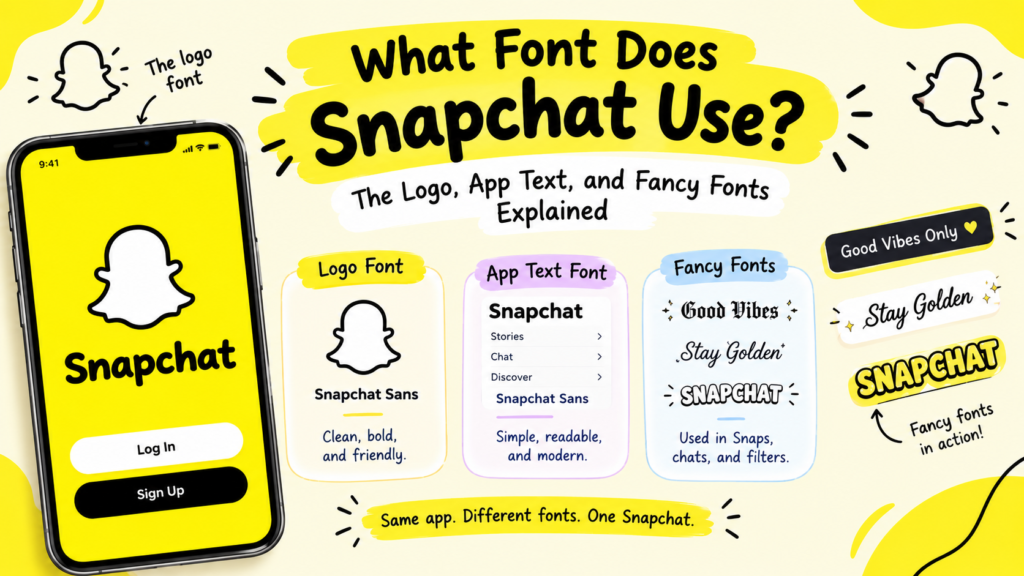
In this guide, you’ll see the real fonts, free lookalikes, and how to get stylish Snapchat text.
1. What Font Does Snapchat Use?
Snapchat’s interface typography, brand lettering, and Snap caption styles serve different purposes. The exact typeface can depend on the part of Snapchat you’re looking at, so there isn’t one simple font name that explains everything.
Snapchat’s Official Brand Typefaces
Snapchat uses its own brand typography, including a custom typeface known as Snapchat Sans in some contexts. Its logo and marketing materials may use different lettering from the text inside the app. These fonts are part of Snapchat’s visual identity, so they aren’t necessarily available for public use.
Here’s Snapchat’s font system at a glance:
| Where | Font | Type | Downloadable? |
|---|---|---|---|
| App interface (chats, menus, captions) | Snapchat Sans | Custom proprietary sans-serif | ❌ No |
| Logo & marketing | Avenir Next | Commercial geometric sans-serif | ❌ No (paid license) |
| Snap caption styles | ~11 built-in fonts | In-app editor fonts | ❌ No (app-only) |
| Fancy usernames (copy-paste) | Unicode styled text | Not a font — characters | ✅ Yes (anywhere) |
Why Does the Snapchat Font Have Different Answers?
People asking about the “Snapchat font” they could mean the app text (Snapchat Sans), the logo (Avenir Next), the caption styles in snaps, or the fancy copy-paste text for usernames.
These are different things, which is why online answers don’t always match.
The easiest way to identify the right option is to consider what you’re trying to recreate. A logo needs a similar typeface or custom lettering, while a stylish display name can often be made with Unicode characters.
Is Snapchat’s Font Available to Download?
No — both Snapchat Sans and Snapchat’s Avenir Next are proprietary and not available for public download.
If you want a similar look for your own design, you can use a free alternative with a clean, modern style. These alternatives won’t be exact copies, but they can create a similar overall feel.
2. What Font Does the Snapchat Logo Use?
The Snapchat logo uses distinctive brand lettering that differs from the text displayed throughout the app. A similar font may help you recreate its general style, but the exact wordmark can include design adjustments that a standard typeface won’t reproduce.
Is the Snapchat Logo Made With a Regular Font?
The Snapchat wordmark and marketing use Avenir Next — a real typeface, but a commercial (paid) one, often with custom tweaks for the brand.
Why the Snapchat Wordmark Looks Different From App Text
A logo is designed to be recognizable, while interface text needs to remain easy to read on a small screen.
Therefore, the logo (Avenir Next) and the in-app text (Snapchat Sans) are two different fonts. The logo font is geometric and polished for branding; Snapchat Sans is rounded and optimized for mobile reading.
This is why a font that looks close to the Snapchat logo may not look like the text you see in chats or menus.
Can You Recreate the Snapchat Logo With a Similar Font?
Yes — for a Snapchat-style logo look, use Avenir (if licensed) or free alternatives.
For a similar clean and rounded style, try Nunito Sans or Montserrat. Nunito Sans has a softer feel, while Montserrat has a more geometric appearance.
Remember, neither is an exact replacement for Snapchat’s logo, but both can work for Snapchat-inspired designs.
3. What Font Does Snapchat Use in Chats and Profiles?
Snapchat controls the typography used in its app interface, so users generally can’t choose a different font for ordinary chats and menus. However, text can look slightly different across phones because of differences in operating systems, available fonts, and how characters are rendered.
Why Snapchat Text Can Look Different on iPhone and Android
The same text may appear slightly different on an iPhone, a Samsung phone, or another Android device. Differences in font rendering and system settings can affect how letters look, especially when a message contains decorative Unicode characters.
Can You Change Snapchat’s Default Font?
No — Snapchat Sans is the default, and there’s no setting to change the app’s interface font. You can only change caption fonts on snaps (below), not the chat/UI font.
Do Display Names and Chat Messages Use the Same Typography?
Yes — display names, chat messages, and the interface all use Snapchat Sans.
But a display name or message containing Unicode characters may look different. That’s because the characters themselves have decorative shapes, rather than relying only on the app’s regular text style.
For example, Alex and 𝓐𝓵𝓮𝔁 may look different even when entered into the same app. The second version uses alternative Unicode characters.
4. What Fonts Are Available for Snapchat Stories and Snaps?
Snapchat offers built-in text styles for captions added to Snaps. These styles let you change the appearance of text directly in the app without downloading or installing a separate font.
How Snapchat’s Built-In Caption Styles Work
When you add text to a snap, Snapchat gives you a set of built-in caption fonts, around 11 styles (including classic, bold, typewriter, handwriting-style, and more) to choose from within the app’s editor.
The available options can change as Snapchat updates the app, so the exact selection may differ by version.
These caption styles are designed for text placed on photos and videos. They are separate from the typography used in menus and chats.
How to Change the Text Style on a Snap
- Take a Snap or choose a photo or video.
- Tap the T (text) icon to add text.
- Type your caption.
- Use the available text-style controls to browse the options.
- Choose a style, adjust the size or color if available, and position the text.
The editor’s controls may vary slightly depending on your version of Snapchat.
Are Snapchat Caption Fonts Available Outside the App?
No — those caption fonts are built into the Snapchat editor and only work on snaps inside the app. They’re not downloadable or usable elsewhere.
5. What Is the Snapchat Fancy Font?
Why Fancy Snapchat Text Is Often Unicode, Not a Real Font
The “Snapchat fancy font” usually refers to decorative text that people copy into their display names, profiles, or messages. It isn’t a special Snapchat font; it is usually Unicode text that uses characters with bold, cursive, or other decorative shapes.
Examples of Stylish Snapchat Text
Here are a few styles using the name “Alex”:
- Bold:
𝐀𝐥𝐞𝐱 - Cursive:
𝓐𝓵𝓮𝔁 - Small caps:
ᴀʟᴇx - Wide lettering:
Alex
Create your own styles with our Snapchat Font Generator. Choose a look, copy the result, and paste it into a supported Snapchat field.
How Unicode Characters Create Different-Looking Letters
These aren’t “Alex” with a font applied — they’re different Unicode characters that already look styled (like 𝐀 = Mathematical Bold A). Because they’re real characters, they paste into Snapchat (and anywhere) and keep their look.
6. How to Get Fancy Fonts on Snapchat
You can add fancy text to Snapchat by generating a style, copying it, and pasting it into a field that accepts those characters. No separate font app is needed.
How to Make Your Snapchat Display Name Look Stylish
- Open our Snapchat Font Generator.
- Enter your name and choose a style.
- Copy the result.
- Open Snapchat and go to your profile settings.
- Find your Display Name, paste the text, and save if accepted.
The exact settings may vary with app updates, and Snapchat may restrict certain characters.
Can You Use Fancy Text in Chats and Profiles?
Often, yes. You can try pasting generated text into a chat message or a profile field that accepts it. However, not every field allows every character, so check the result before relying on it.
7. Why Does Snapchat Fancy Text Sometimes Look Different?
Fancy text may appear differently across phones because each device uses its available fonts to display Unicode characters. If a device cannot display a particular character, it may show a square or another substitute.
Why Do Some Characters Appear as Squares?
A square usually means the device or font lacks a suitable glyph for that character. Try a simpler style or test the text on another device.
Why Does Fancy Text Look Different on Different Phones?
The same character may have slightly different shapes or spacing on iPhone and Android devices. The character itself has not changed; its appearance depends on how the device renders it.
Does Fancy Text Work in Every Snapchat Field?
No. Some fields may reject decorative characters, and other users may see them differently. Test your chosen style in the exact field where you plan to use it.
8. Best Free Fonts Similar to Snapchat’s Typography
Since Snapchat Sans and Avenir Next are proprietary, here are free alternatives (from Google Fonts) for Snapchat-inspired designs that are worth trying. They offer clean, modern styles, although none should be treated as an exact copy of Snapchat’s proprietary typography:
- Public Sans — the closest free match to Snapchat Sans (clean, neutral, open-source)
- Nunito Sans — rounded, friendly, similar feel
- Montserrat — geometric, good for a logo-style look
- Open Sans / Lato — clean sans-serifs for body text
Quick comparison of the free alternatives:
| Free font | Best match for | Feel | Free for commercial use? |
|---|---|---|---|
| Public Sans | Snapchat Sans (app text) | Clean, neutral | ✅ Yes |
| Nunito Sans | Snapchat’s rounded look | Soft, friendly | ✅ Yes |
| Montserrat | Logo-style designs | Geometric, bold | ✅ Yes |
| Open Sans / Lato | Body text | Clean, readable | ✅ Yes |
These fonts are available through Google Fonts. Check the individual font’s current license before using it in a commercial project, especially if you plan to modify or redistribute the font files.
What to Know About Font Licensing
A font being available online doesn’t automatically mean it can be used for every purpose. Many Google Fonts are open source and allow commercial use under their respective licenses, while proprietary fonts may require permission or a paid license.
The Google Fonts (Public Sans, Nunito Sans) are free for commercial use. Avenir Next and Snapchat Sans are not free. You can’t use them commercially without a license.
Moreover, for a Snapchat-style design, stick to the free alternatives.
9. Snapchat Font vs. Caption Styles vs. Unicode Fancy Text
The main difference is where the text style comes from. Snapchat controls its interface typography, its editor provides styles for Snap captions, and Unicode text lets you copy decorative characters into supported fields.
Let’s have a quick look at Snapchat’s fonts:
| Type | What it is | Can you use it? |
|---|---|---|
| Snapchat Sans | The app’s proprietary interface font | No. It’s built-in, not downloadable or changeable |
| Avenir Next | The proprietary logo font | Only with a paid license (use free lookalikes) |
| Caption fonts | ~11 built-in snap text styles | Only inside the Snapchat snap editor |
| Unicode fancy text | Copy-paste styled characters (𝓯𝓪𝓷𝓬𝔂) | Yes. You can use them anywhere for display names & chats |
Remember, you can’t control or download Snapchat’s own fonts. For a stylish name, use copy-paste Unicode fancy text.
Frequently Asked Questions
What font does Snapchat use?
Snapchat uses Snapchat Sans for its app interface (chats, captions, menus) and Avenir Next for its logo and marketing. Both are proprietary.
What font is used in the Snapchat logo?
The Snapchat logo uses distinctive brand lettering that is different from ordinary app text. The logo has Avenir Next, a geometric humanist sans-serif by Adrian Frutiger. It’s different from the in-app font (Snapchat Sans).
Is Snapchat Sans a real font?
Yes, it’s Snapchat’s custom proprietary interface font, introduced in 2016. But it’s not available to download or use outside the app.
Can I download the official Snapchat font?
No, Snapchat Sans and Avenir Next are Snapchat’s proprietary and not available for public download. If you need similar typography for a design, try free alternatives such as Public Sans or Nunito Sans and check their licenses before using them.
How do I change the font on Snapchat?
You generally can’t change the font used throughout Snapchat’s interface (Snapchat Sans is fixed). You can change caption fonts on snaps (via the text tool), and use copy-paste Unicode fancy text for your display name.
How do I get fancy fonts for my Snapchat username?
Use a Snapchat Font Generator to create decorative Unicode text, then copy and paste it into your display name if the characters are accepted. Test the result because not every style works in every field or on every device.
Why does my Snapchat font look different on another phone?
Different devices render Unicode and system fonts differently, so styled text (and even Snapchat Sans on Samsung) can look slightly different across phones.
Can I use Snapchat fonts outside Snapchat?
You can’t use the proprietary ones (Snapchat Sans, Avenir Next). For a similar look, use free alternatives like Public Sans. For copy-paste styled text, use Unicode fonts (which work anywhere).
What font size does Snapchat use?
Snapchat controls the sizing of its interface text, and users generally don’t have a setting to change the size of every menu or chat label. When adding text to a Snap, you can adjust the caption’s size using the editor’s available controls.
Final Thoughts: Which Snapchat Font Are You Looking For?
“What font does Snapchat use” has a few answers depending on what you need. Snapchat’s interface, its logo, and its Snap caption styles serve different purposes, while fancy text copied into a display name usually relies on Unicode characters.
There are three main fonts: Snapchat Sans (the app’s text), Avenir Next (the logo), the built-in caption fonts (on snaps), or Unicode fancy text (for stylish usernames).
You can’t download or change Snapchat’s own fonts but for a matching design, use free Public Sans, and for a stylish display name, use copy-paste Unicode.
If you want a stylish Snapchat name or message, use our Snapchat Font Generator to explore decorative text. Just test your chosen characters before relying on them, because their appearance and compatibility can vary across devices.