
Why Minecraft Formatting Codes and Unicode Fancy Text Are Not the Same Thing
Introduction: Two Ways to Change Minecraft Text
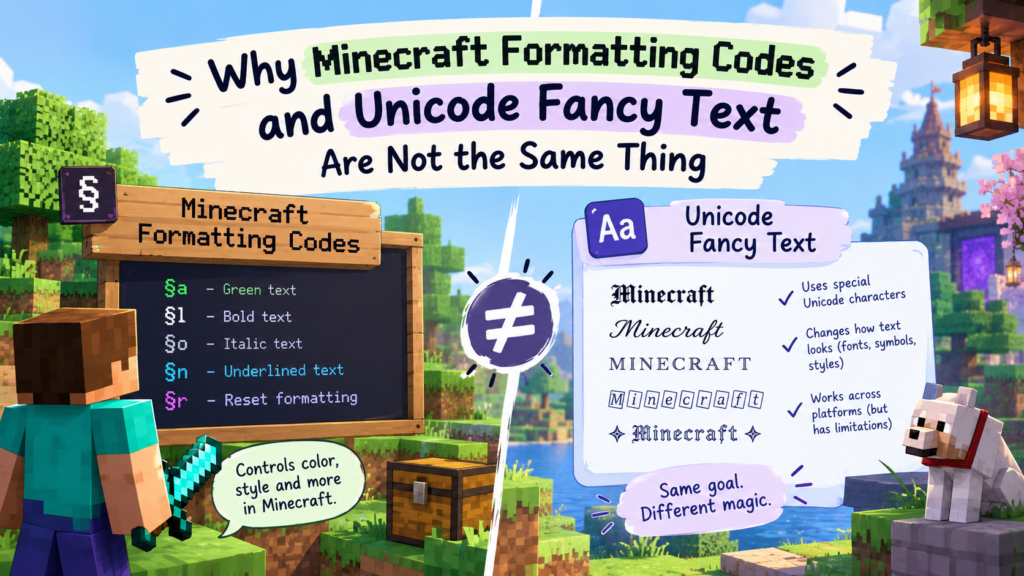
Minecraft formatting codes and Unicode fancy text can make words look different, but they do not work the same way. Formatting codes tell Minecraft how to display ordinary text, while Unicode fancy text uses different characters that already have a decorative appearance. Both can change how a message looks, but the difference matters when you want your text to work in chat, server names, signs, or other places.
For example, §lHello uses a Minecraft formatting code to display “Hello” in bold wherever that formatting is supported. By contrast, 𝐇𝐞𝐥𝐥𝐨 uses separate Unicode characters that resemble bold letters. One relies on Minecraft’s formatting system; the other relies on the characters supported by the game and its fonts.
Build Minecraft § color codes with our Minecraft font generator.
What Are Minecraft Formatting Codes?
Minecraft formatting codes are special instructions that change how text appears in supported parts of the game. They can apply colors and styles such as bold, italic, and strikethrough without replacing the ordinary letters themselves. The system commonly uses the section sign (§) followed by a character that tells Minecraft which formatting option to apply.
How Minecraft’s Formatting System Works
Minecraft has a built-in system for styling text using the section sign (§) followed by a code. When Minecraft sees §, it reads the next character as an instruction: “make the following text red,” “make it bold,” etc. The letters remain the same; it changes only the visual representation.
However, whether a code works depends on where the text is displayed, the Minecraft edition and version, and any restrictions imposed by the server or application.
What Do the § Symbol and Formatting Codes Do?
The section sign (§) introduces a formatting instruction, while the character after it identifies the color or style. Minecraft has several familiar codes for changing text appearance.
§c— red text§a— green text§9— blue (and more color codes)§l— bold text§o— italic text§n— underlined text§m— strikethrough text§k— random shifting characters§r— reset (back to normal)
For example, §e§lGold Bold combines the gold color with bold styling in a context that supports these codes. You can combine compatible formatting options to create more distinctive text.
How Formatting Codes Affect Ordinary Text
The letters themselves stay standard A-Z — Minecraft just applies a visual layer (color/style) when rendering. The word “Hello” remains the same underlying text whether it appears in red, bold, or italics. If the formatting instruction is removed, the original letters are still there.
This makes formatting codes useful for changing a message’s appearance without manually replacing every character. Their main limitation is that Minecraft or the surrounding platform must recognize and process the formatting instructions.
What Is Unicode Fancy Text?
Unicode fancy text works the opposite way: instead of styling normal letters, it replaces them with different characters that are already shaped to look bold, italic, or decorative. For example, Hello can become 𝐇𝐞𝐥𝐥𝐨 by replacing its letters with mathematical bold characters.
How Unicode Creates Different-Looking Letters
Unicode assigns individual code points to characters used across languages, writing systems, and symbols. Some of these characters resemble familiar Latin letters but have a distinctive appearance.
Here are a few examples:
- Bold:
𝐇𝐞𝐥𝐥𝐨 - Italic:
𝐻𝑒𝑙𝑙𝑜 - Script:
𝓗𝓮𝓵𝓵𝓸 - Double-struck:
ℍ𝕖𝕝𝕝𝕠
These styles are made from actual Unicode characters, not simply from applying a different font to ordinary letters. That is why you can often copy fancy text from a generator and paste it into another application without needing to install the original font.
Why Unicode Fancy Text Is Not Simply a Font Change
Unicode fancy text is different from changing a font in a word processor. For example, 𝐇 is not the letter “H” with a bold font applied, it’s a completely separate Unicode character (Mathematical Bold Capital H, code point U+1D407). It is not the ordinary letter H with bold formatting applied.
This distinction affects how text behaves. A font change usually alters the appearance of the same underlying characters, while Unicode fancy text substitutes different characters.
As a result, decorative text may behave differently when searched, copied, processed by software, or displayed on another device.
Why Fancy Text Can Look Different Across Devices
Unicode defines the character, but the device still needs a font that can draw it. If the required character is not supported by the available font, the text may appear as an empty square, a question mark, or another substitute.
Most modern devices can, but older ones may show boxes (□). You can learn more in our guide on why fancy text sometimes appears as boxes.
Minecraft Formatting Codes vs. Unicode Fancy Text: What’s the Difference?
The main difference is that Minecraft formatting codes change how supported text is displayed, whereas Unicode fancy text replaces ordinary letters with alternative characters.
Formatting codes can apply colors and styles through Minecraft’s rendering system; Unicode characters carry their own character identities and do not independently add color.
| Feature | Minecraft Formatting Codes | Unicode Fancy Text |
|---|---|---|
| Mechanism | Markup prefix (§ + letter/number) | Distinct Unicode code points |
| Underlying data | Standard letters stay normal A-Z | Letters replaced with specialized symbols |
| What changes | The styling (a visual layer) | The characters themselves |
| Flexibility | Easy to turn on/off or mix dynamically | Hardcoded per letter; retype to change |
| Colors | ✅ Yes (§ color codes) | ❌ No (Unicode can’t add color) |
| Portability | Confined to Minecraft/supported plugins | Universal — works in Discord, Instagram, web |
| Works in Minecraft chat | ✅ Yes (where codes are enabled) | ⚠️ Sometimes (if the character is supported) |
| Needs game code to render | Yes (§ system) | No (just displays as text) |
For example, §lHello uses a formatting instruction to make ordinary letters bold, while 𝐇𝐞𝐥𝐥𝐨 contains different Unicode characters. The first depends on a system that understands Minecraft formatting codes; the second depends on a system that can display the selected characters.
Neither method works everywhere without limitations. Minecraft formatting codes may be ignored or displayed literally in unsupported contexts, while Unicode fancy text may be blocked or rendered incorrectly by a game, server, or device.
Why Are §lHello and Unicode Bold Text Different?
§lHello and 𝐇𝐞𝐥𝐥𝐨 may look similar, but the first uses a formatting instruction and the second uses alternative Unicode characters. This difference determines how each version is interpreted and where it can be displayed correctly.
What Minecraft Does With §lHello
When Minecraft sees §lHello, it reads §l as “turn on bold,” then displays the normal letters H-e-l-l-o in bold. The letters are still standard “Hello” underneath.
The instruction is specific to systems that recognize Minecraft formatting codes. If you paste the literal string §lHello into an ordinary text field or an application that does not interpret these codes, it may simply appear as §lHello.
How Unicode Bold Text Works
The text 𝐇𝐞𝐥𝐥𝐨 uses separate Unicode characters that resemble bold versions of the letters in “Hello.” There is no Minecraft formatting instruction involved, so another application can display the same characters if it supports them.
However, Unicode bold characters are not a universal replacement for formatting. They may look different from the game’s native bold style, and some applications may not support every character. They also do not provide the same flexible styling controls as Minecraft’s formatting system.
Why One Method May Work When the Other Doesn’t
§lHello works inside Minecraft (where the § system is active) but can’t be used elsewhere (paste it into Discord, and you see literal “§lHello”).
𝐇𝐞𝐥𝐥𝐨 works anywhere that supports those characters (Discord, Instagram, Minecraft chat if supported) but can’t add color and may show as boxes if unsupported.
Why Doesn’t Unicode Fancy Text Always Work in Minecraft?
Unicode fancy text does not always work in Minecraft because the game, its fonts, or the server may not support the characters or allow them in a particular text field.
A character that displays correctly in a browser or messaging app may appear as a square, be removed by a filter, or fail to display as expected in Minecraft.
Here are the most common reasons:
- Unsupported characters / missing glyphs: Minecraft’s font may not have a drawing for a fancy character, so it shows a square (□) or question mark.
- Font and device differences: Java Edition, Bedrock Edition, different versions, and different devices may render the same character differently.
- Server restrictions & filtering: Some servers filter or block certain characters in chat messages, usernames, or other text fields.
- Text-field limitations: A character may work in one place but not another because different parts of the game handle text differently.
A missing glyph does not necessarily mean the Unicode character is invalid. It may simply mean that the software or font being used cannot display it. Likewise, a server rejecting a character does not prove that the character is unsupported by Unicode itself.
Unicode fancy text can work in some Minecraft contexts, but it is less predictable than using the game’s supported formatting features for ordinary styling. Test your text in the exact place where you intend to use it.
Can You Use Minecraft Formatting Codes and Unicode Fancy Text Together?
Yes, Minecraft formatting codes and Unicode characters can be used together to create more decorative text. The formatting code controls supported visual effects, such as color or bold styling, while Unicode characters decorate the letters or symbols.
When Combining Both Methods Makes Sense
Combining the two approaches can be useful when you want colored text with decorative symbols. For example, a compatible Minecraft text renderer may interpret §6꧁ §lVIP §6꧂ as gold-colored decorative framing around bold “VIP” text.
In this example, the § codes provide the formatting instructions, while the decorative characters come from Unicode. The result depends on the renderer recognizing the formatting codes and having suitable glyphs for the decorative symbols.
Examples of Combined Text
Here is another example:
§c★ §lRed Star §c★— uses red formatting, bold text, and Unicode star symbols where supported.
You can also experiment with decorative Unicode characters in server names or messages that support them, then use formatting codes where the relevant text system permits it.
What Limitations Should You Know About?
Combining the two methods does not guarantee that the final text will work everywhere. A server may remove formatting codes, block certain Unicode characters, or restrict both. Decorative symbols may also look different across fonts and devices.
Importantly, Minecraft formatting codes can affect following text that the renderer supports, including Unicode characters in many contexts. However, a formatting instruction cannot make a missing Unicode glyph appear, and the final result depends on the renderer.
Always test the combination before using it in an important message or sign.
Which Method Should You Use in Minecraft?
Use Minecraft formatting codes when you want supported colors and text styles, and use Unicode fancy text when you want decorative characters.
If you need both, you can try combining them, but check compatibility before relying on the result.
Choose Minecraft formatting codes when:
- You want supported text colors, bold, italics, or other native styles.
- You are working in a Minecraft feature, server, or tool that recognizes those codes.
- You want to change the appearance of ordinary letters without replacing them.
Choose Unicode fancy text when:
- You want decorative letters or symbols that you can copy and paste.
- You want to reuse the same characters in other applications.
- The Minecraft text field or server allows the characters you have chosen.
Before deciding, consider your Minecraft edition, version, server rules, and the location where the text will appear. Chat, signs, books, server messages, and other text fields do not necessarily handle formatting in the same way.
Common Myths About Minecraft Text Customization
Several common misconceptions arise because Minecraft formatting codes and Unicode fancy text can produce similar visual results. Understanding how each system works makes it easier to choose the right method.
Myth 1: Unicode fancy text is just a different font.
Not exactly. Unicode fancy text uses alternative characters, such as mathematical bold letters, rather than simply applying a new font to ordinary letters. A font change and a character substitution may look similar, but they are technically different.
Myth 2: Minecraft formatting codes work everywhere in the game.
No. Formatting codes work in supported contexts where they are recognized and processed. Their availability can vary by edition, version, text field, and server configuration.
Myth 3: If I can copy a Unicode character, Minecraft must support it.
No. Being able to copy a character does not guarantee that Minecraft can display it or that a server will allow it. The available font and any text restrictions can affect the result.
Myth 4: Unicode bold letters behave exactly like Minecraft bold formatting.
No. Minecraft’s bold formatting changes how supported characters are rendered, while Unicode bold uses separate characters. The two can look similar but are not interchangeable, and Unicode bold does not independently provide color or Minecraft formatting controls.
How to Test Whether Your Minecraft Text Will Work
The most reliable way to check Minecraft text is to test it in the same edition, version, server, and text field where you plan to use it. A character or formatting code that works in one environment may behave differently in another, so a quick test is more useful than assuming compatibility.
Follow these steps:
- Check your Minecraft edition. Test the text in the Java or Bedrock Edition you actually use, since their text-handling behavior can differ.
- Test it on the intended server. Server settings and filters may affect formatting codes or decorative Unicode characters.
- Try it in the correct text field. Chat, signs, books, server messages, and other features may have different requirements.
- Check the displayed result. Look for missing-glyph squares, question marks, literal formatting codes, or characters that have been removed.
- Test after saving or sending. Some problems become apparent only after the game processes the message or stores the text.
A short test can save you from discovering that a decorative name, message, or sign does not display correctly when you actually need it.
Frequently Asked Questions
Are Minecraft formatting codes Unicode characters?
Short answer: No. The formatting codes are instructions (§ + a code) that tell Minecraft how to style normal letters. Unicode fancy text is different characters entirely that already have a particular appearance.
How do you get fancy text in Minecraft?
There are two ways to get fancy text in Minecraft: use § formatting codes for colors/styles (built into Minecraft), or paste Unicode fancy text (from a font generator) for decorative letters where supported. For § color codes, try our Minecraft font generator.
What are the text formatting codes in Minecraft?
Minecraft formatting codes include color codes such as §c for red, §a for green, and §9 for blue, as well as style codes such as §l for bold, §o for italic, §n for underline, and §m for strikethrough. The §k code enables obfuscated text, while §r resets formatting. Their behavior depends on whether the relevant text system supports them.
Is §l the same as Unicode bold text?
No. §l is a Minecraft formatting instruction that applies bold styling to following text in a compatible context. Unicode bold text, such as 𝐇, uses a different Unicode character. The two may look similar, but they work differently and have different compatibility requirements.
Can Unicode fancy text change Minecraft text colors?
No — Unicode fancy text does not add color by itself. Only Minecraft’s § color codes (or rich-text systems) do color. Unicode changes letter shape, not color.
Why does fancy text work on one Minecraft server but not another?
Minecraft servers can apply different chat filters and character restrictions. One server may allow decorative Unicode characters, while another may remove or reject them. The Minecraft edition, text field, and available fonts can also affect the result.
Can Minecraft formatting codes be copied and pasted?
Yes, you can copy and paste the literal text containing formatting codes, but the codes will only affect the appearance of the text in a context that recognizes them. In an ordinary text field or an application without Minecraft formatting support, §lHello may appear exactly as typed instead of displaying “Hello” in bold.
Do Java Edition and Bedrock Edition support the same text features?
Not identically — both support § formatting codes, but there are differences in where codes work, how they’re entered, and how Unicode renders. Test in your specific edition.
Final Thoughts: Choose the Right Tool for the Right Text
Minecraft formatting codes and Unicode fancy text can both change how text looks, but they work in fundamentally different ways. Formatting codes tell a compatible text renderer to apply styles such as color or bold, while Unicode fancy text replaces ordinary letters with alternative characters that have a decorative appearance.
Use Minecraft formatting codes when you need supported colors and styles. Choose Unicode fancy text when you want decorative characters that can be copied into other applications, and remember that their appearance depends on character and font support. If you combine both methods, test the result in your intended Minecraft environment.
Ready to experiment with Minecraft text styling? Try our Minecraft Font Generator and check that your chosen formatting works where you plan to use it.