
How to Create a Stylish Gaming Username: A Complete Guide
Introduction
A stylish gaming username is more than random symbols slapped onto a word — it’s memorable, readable, and true to your gaming personality, while still working inside the game you play. Anyone can paste a pile of decorations onto a name; the skill is making it look cool and stay recognizable in a fast-moving lobby.
This guide walks you through the whole process: choosing a style that fits you, building the base name, adding fancy Unicode text and symbols the right way, and — crucially — making sure it actually displays in your game (because not every fancy character works everywhere). By the end, you’ll be able to create a username that stands out without becoming an unreadable mess.
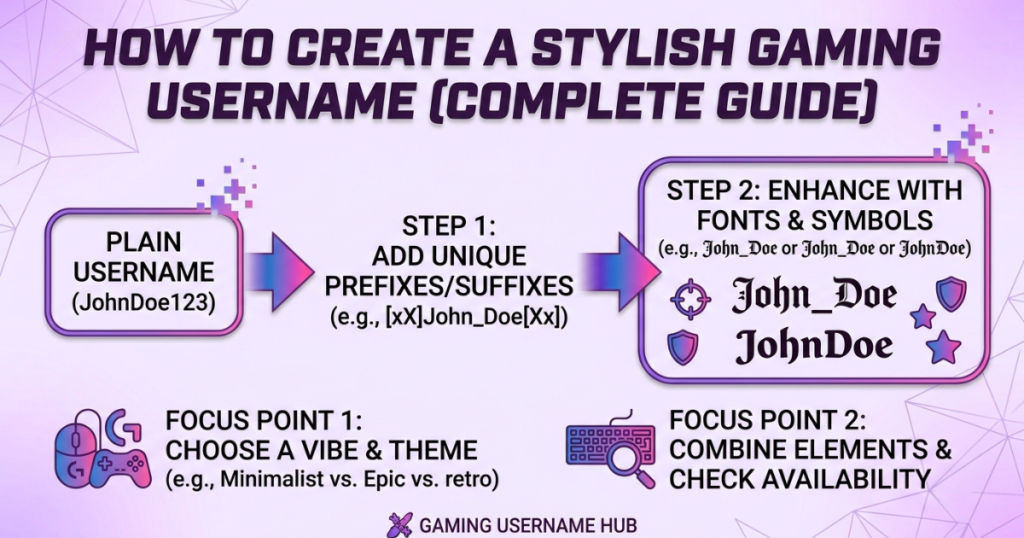
What Makes a Gaming Username Stand Out?
The best gaming names share a few traits:
- Short and memorable — easy to say in voice chat and easy for others to recall
- Easy to recognize in-game — readable at a glance in the kill feed or lobby
- Distinctive without being hard to read — unique, but not a puzzle
- Matches your style — aggressive, aesthetic, funny, or pro — it should feel like you
- Works across your platforms — displays correctly in the games and apps you use
Notice that “covered in symbols” isn’t on the list. A great username balances style with clarity — decoration serves the name, not the other way around.
Wondering where fancy usernames actually work? Here’s the full breakdown of whether you can use Unicode text in usernames — and why it usually works in display names, not the @handle.
Decide What Style You Want
Before generating anything, pick a direction. Your style shapes every other choice:
Minimal and Clean
Simple, sharp, no clutter. A short word or name, maybe light styling. Reads instantly. Great for competitive players who want recognition over decoration.
Bold and Powerful
Strong words (Titan, Havoc, Vortex) in heavy bold styling. Commands attention. Good for aggressive playstyles.
Dark and Mysterious
Shadow, night, and death themes (Reaper, Oblivion, Wraith) in gothic styling. Intimidating and atmospheric.
Funny and Playful
Unexpected or punny combinations that make people smile. Memorable through humor rather than intensity.
Futuristic and Tech-Inspired
Cyber, neon, and sci-fi vibes (Nexus, Cipher, Vortex) — often with glitch or monospace styling.
Competitive and Professional
Short, clean, esports-ready. Something that would look right on a tournament roster — no heavy decoration.
Aesthetic and Decorative
Soft, stylish, symbol-accented names — popular for casual and cozy gaming profiles.
Pick one before you build, so your name has a consistent identity instead of feeling random.
How to Build a Stylish Gaming Username
A strong name usually comes from combining a few simple parts:
- Start with a base name — your name, nickname, or a word you like (Alex, Shadow, Frost).
- Add a word that represents your style — ShadowStrike, FrostByte, NightOwl.
- Experiment with numbers — sparingly, and meaningfully (a lucky number, jersey number) — not random digits.
- Use initials or shortened words — AK, xX, or trimming a long word to fit.
- Combine two unrelated words — often the most memorable (IronWolf, VoidKing, PixelGhost).
- Keep the final name easy to remember — if you can’t say it out loud easily, simplify it.
Example evolution: “Alex” → “ShadowAlex” → “AlexVoid” → “𝗔𝗹𝗲𝘅𝗩𝗼𝗶𝗱” → ꧁𝗔𝗹𝗲𝘅𝗩𝗼𝗶𝗱꧂. Each step adds identity, then style — in that order.
How to Use Fancy & Unicode Characters in Gaming Names
Here’s what’s actually happening when you use a “fancy font” in a gaming name:
Unicode characters are special text characters that already look bold, italic, or decorative (like 𝗕𝗼𝗹𝗱 or 𝓼𝓬𝓻𝓲𝓹𝓽). A fancy text generator swaps your normal letters for these look-alike characters. Because they’re real text — not an installed font — they copy and paste into your game’s name field and display without anyone needing to install anything.
This is different from installing a font. A downloaded font only works on your device in design apps; it can’t go into your in-game name. Unicode characters travel with your text, which is exactly why they work for usernames. (For a deeper explanation, see our guide on how fancy fonts work.)
Unicode makes a username distinctive when used with restraint — a bold or gothic style plus one clean symbol reads as intentional. Piled on, it turns to noise (and often breaks — more below).
How to Make a Gaming Username Look Stylish With Unicode
The main Unicode looks for gaming names:
Bold Unicode
𝗦𝗵𝗮𝗱𝗼𝘄 — strong and readable, the safest stylish choice.
Italic & Script
𝓢𝓱𝓪𝓭𝓸𝔀 — flowing and elegant, good for aesthetic names.
Small Text & Superscript
ˢʰᵃᵈᵒʷ — tiny accents, often used for “pro tags” like ᴳᴼᴰ or ᴾᴿᴼ before a name.
Decorative Symbols
꧁ ꧂, 乂, 亗, ★ — frames and marks that wrap or accent the name.
Special Spacing & Combinations
Wrapping a name in symbols (乂 Shadow 乂) or adding a trailing mark (Shadow彡).
Important: not every decorative character works everywhere. Bold, italic, and small caps are the most reliable; heavy symbol stacks and rare glyphs are the ones that break or show as boxes.
Gaming Username Examples by Style
Rather than 100 random names, here’s the formula for each style so you can build your own:
| Style | Formula | Example direction |
|---|---|---|
| Clean | Short name + simple word | AlexFrost |
| Bold | Strong word + bold Unicode | 𝗩𝗢𝗥𝗧𝗘𝗫 |
| Dark | Shadow/night word + gothic | 𝕽𝖊𝖆𝖕𝖊𝖗 |
| Futuristic | Tech word + glitch/mono | 𝙲𝚢𝚙𝚑𝚎𝚛 |
| Funny | Two unexpected words | ToastGoblin |
| Aesthetic | Short word + subtle symbol | ꒰ঌ luna ໒꒱ |
| Competitive | Short, sharp, recognizable | Zqno |
Plug your own base name into any formula and style it in a generator.
How to Choose Symbols for a Gaming Username
Symbols make or break a name:
- For readability — a single symbol on each side (乂 Name 乂) frames without clutter
- For separation — a symbol between two words (Shadow乂Ace) reads cleaner than a cramped gap
- When symbols become excessive — more than one on each side usually hurts, not helps
- Why uncommon symbols cause problems — rare glyphs are the most likely to show as boxes or get rejected by the game’s filter
Rule: one strong, common symbol beats four exotic ones — every time.
Should You Use Fancy Fonts or Regular Letters?
An honest comparison, because it matters for usernames:
| Regular Letters | Unicode Stylized Text |
|---|---|
| Works broadly, everywhere | Compatibility varies by game |
| Easy to read | Can look more decorative |
| Simple appearance | More visual styles available |
| Usually safest for usernames | Some characters may not be supported |
The honest takeaway: if a game filters names strictly (many do), regular or lightly-styled letters are safest. Where a game allows Unicode, bold or gothic gives style without much risk. And remember — “fancy fonts” for copy-paste are Unicode characters, not downloadable fonts — so what works depends on the game’s character support, not on any font you install.
Check Whether Your Username Is Easy to Read
Before you commit, check for:
- Confusing letter combinations (does it read clearly?)
- Similar-looking characters (O vs 0, l vs I, styled letters that blur)
- Excessive symbols (is the name buried?)
- Very small Unicode (tiny characters vanish in a kill feed)
- Too many mixed styles (pick one, not three)
- Mobile readability (many players are on phones — check small-screen legibility)
If a teammate can’t read it aloud, simplify it.
Check Username Compatibility Before Using It
This is where stylish names succeed or fail:
Character Limits
Games cap name length (Free Fire 12, PUBG/BGMI 14, Fortnite 3–16). Symbols count toward the limit.
Supported Characters
Each game supports a different range of Unicode. Some accept most styles; some (like PUBG) reject most fancy letters and only take symbols.
Special Symbol Restrictions
Some symbols are blocked; some are allowed. It varies by game.
Platform-Specific Differences
The same name may render differently on PC vs mobile, or iPhone vs Android.
What Happens When a Character Isn’t Supported?
The game shows a box (□), strips the character, or refuses to save the name. That’s why testing matters. (More on this in our guide to why fancy text shows as boxes.)
Why Some Stylish Gaming Names Don’t Work in Every Game
This is the part most guides skip — and it’s the honest key to a name that actually works.
Every game handles names differently. A username that looks perfect in one game can break, box, or get rejected in another because:
- Different character filters — PUBG and Free Fire heavily filter names; a fancy style that works in your Discord may be rejected in-game.
- Different Unicode support — a game built to accept only basic characters will strip or box anything fancy.
- Different character limits — a name that fits Fortnite’s 16 may be too long for Free Fire’s 12.
- Different rendering — the game’s own font may not have a drawing for a rare styled character, showing a box.
The practical fix: build your name, then test it in the actual game before spending a rename (many games let you preview, or you can check in a friend’s lobby). Start with the most reliable styles (bold, small caps, common symbols) and only get exotic where you’ve confirmed it works. For game-specific tools built around each game’s exact rules and limits, see our PUBG, Free Fire, BGMI, Fortnite, and Roblox generators — or the full gaming fonts hub.
Common Gaming Username Mistakes to Avoid
- Too long — hard to read, may not fit the limit
- Too many symbols — buries the name
- Unrecognizable characters — nobody can read or type it
- Copying another player too closely — confusing (and sometimes against rules)
- Hard-to-type characters — annoying if you ever need to type it
- Relying entirely on decoration — a name should work even in plain text
- Impossible to remember — if teammates can’t recall it, it’s not doing its job
How to Create a Stylish Gaming Username With a Font Generator
The simple process:
- Enter your base username in a font generator.
- Generate different styles — bold, gothic, script, and more.
- Compare the results side by side.
- Choose a readable version — style that still reads clearly.
- Copy the text.
- Check it on your target game — paste and preview before saving.
- Save your final username.
Try it with our gaming fonts hub (each game’s tool shows its character limit and which styles work), or the fancy font generator for general styling.
Stylish Gaming Username Ideas You Can Build Yourself
The formula behind each style (build your own instead of copying a list):
- Dark: shadow/night/death word + gothic style + optional ༒ (𝕽𝖊𝖆𝖕𝖊𝖗, 𝕹𝖎𝖌𝖍𝖙𝕱𝖆𝖑𝖑)
- Clean: short base + short word, minimal styling (FrostAce, ZaneOP)
- Competitive: short + sharp + bold, no clutter (𝗩𝗲𝘅, 𝗤𝗶𝗱)
- Funny: two unexpected words (ToastGoblin, AngryPotato)
- Aesthetic: soft word + subtle symbol (๛lunaㅤ, ꒰ঌ mist ໒꒱)
- Futuristic: tech word + glitch/mono (𝙑𝙤𝙞𝙙, C̶i̶p̶h̶e̶r̶)
For Your Name
Style your real name or nickname: Alex → 𝗔𝗹𝗲𝘅 → ꧁𝗔𝗹𝗲𝘅꧂. Personal and stylish.
For Girls
Softer styling + delicate symbols: ✿ 𝓐𝓻𝓲𝓪 ✿, ꒰ঌ Luna ໒꒱, ♡𝓜𝓲𝓼𝓽♡.
For Boys / Attitude
Bold or gothic + sharp symbols: 亗 𝗦𝗵𝗮𝗱𝗼𝘄 亗, ꧁༒𝕽𝖆𝖌𝖊༒꧂, 乂 𝗩𝗲𝗻𝗼𝗺 乂.
What to Do If Your Fancy Gaming Username Doesn’t Work
Some characters appear as squares
The game can’t render that character — switch to a more common style (bold, small caps).
The game removes special characters
Its filter stripped them — use a lighter style or symbols the game accepts.
The username looks different after pasting
The game’s font renders it differently — preview before saving; pick a widely-supported style.
The game doesn’t allow certain symbols
Some symbols are blocked — swap for allowed ones (★, common brackets).
Try a simpler Unicode version
When in doubt, bold or small caps almost always works — save the exotic styles for platforms that support them.
Frequently Asked Questions
What makes a gaming username stylish?
A balance of a memorable base name, a style that fits your personality, light Unicode styling, and one or two clean symbols — while staying readable and fitting the game’s limits.
How can I make my username look unique?
Combine two words, add a meaningful number or initial, and apply a Unicode style (bold, gothic, script) with a subtle symbol. Uniqueness comes from the combination, not from piling on decoration.
How do I make a good gaming username?
Start with a base name, add a word matching your style, keep it short and readable, then style it in a generator and test it in your game.
Can I use Unicode characters in gaming usernames?
Yes, in games that support them. Bold, gothic, and small caps are most reliable; heavily filtered games (PUBG, Free Fire) accept symbols more than fancy letters — test first.
Are fancy gaming fonts actually fonts?
No — they’re Unicode characters that look styled, not installed fonts. That’s why they copy-paste into name fields.
Why don’t some fancy characters work in games?
The game filters names, has limited Unicode support, or its font can’t draw that character — so it strips it or shows a box.
Can I use symbols in a gaming username?
Usually yes, but games vary. One or two common symbols (★ 乂 ꧁꧂) are safest; rare ones may be blocked or box.
Should a gaming username be short?
Yes — short names are more memorable, fit character limits, and read better in-game. Aim for something easy to say aloud.
What’s a badass / cool gamer name?
Dark or bold combinations work well — Reaper, Vortex, Havoc, Onyx — styled in gothic or bold. Build your own with the formulas above rather than copying a common one.
Why does my username look different on another device?
Different devices render Unicode with different fonts. A widely-supported style (bold, small caps) looks most consistent everywhere.
Can I change a normal username into a fancy one?
Yes — paste your name into a font generator, pick a style, and use it (where the game/platform allows; the @account name itself may need plain text, but display names usually accept styling).
Are Unicode gaming usernames safe to copy and paste?
Yes — they’re just text characters. No app, no download, nothing that affects your account beyond normal typing.
Quick Checklist for a Stylish Gaming Username
- ✓ Easy to remember
- ✓ Easy to read
- ✓ Fits the game’s character limit
- ✓ Uses supported characters
- ✓ Doesn’t rely on excessive symbols
- ✓ Looks good on the target platform
- ✓ Doesn’t closely imitate another player
- ✓ Still works when displayed on different devices
Conclusion: Style + Readability + Compatibility
A great gaming username isn’t the one with the most symbols — it’s the one that’s stylish, readable, and actually works in your game. Pick a style that’s yours, build a memorable base name, add Unicode and symbols with restraint, and always test it in-game before you commit. Ready to build one? Start with our gaming fonts hub and find the tool for your game.