
The Unicode Characters That Look Like Normal Latin Letters but Aren’t
Introduction
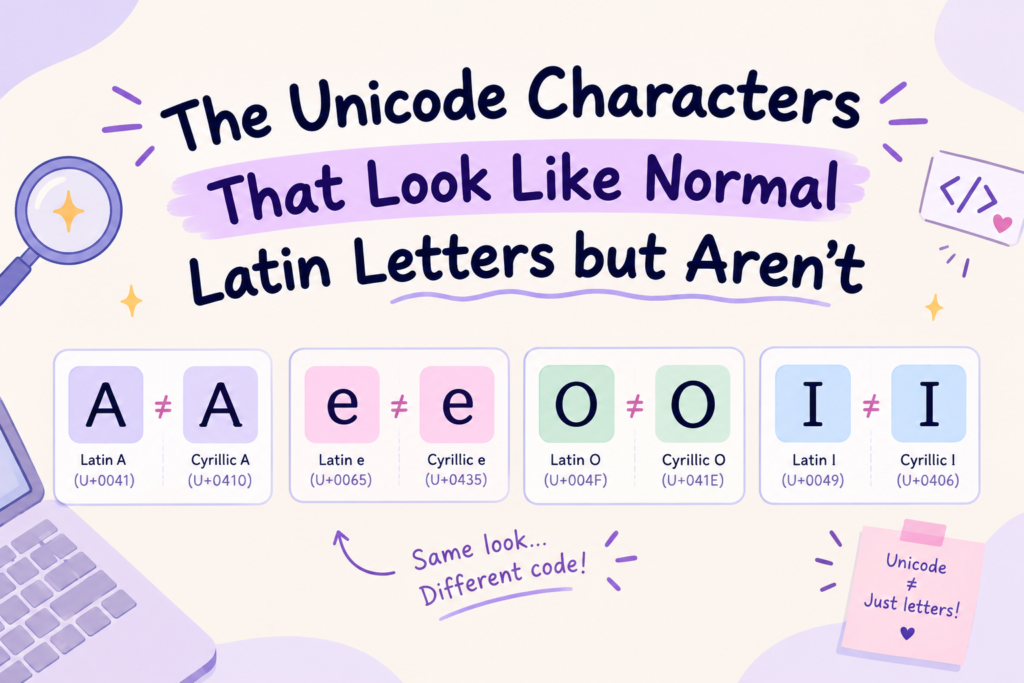
Some Unicode characters look exactly like normal English letters but are completely different characters underneath. The clearest example: A (Latin), Α (Greek Alpha), and А (Cyrillic A) look nearly identical — but they’re three different Unicode characters with three different code points. These “look-alikes” (called homoglyphs) cause real problems: copied text won’t match in search, usernames behave strangely, and moderation filters can be fooled.
This guide shows you the common look-alikes, why they exist, and how to spot them.
What Are Unicode Characters That Look Like Latin Letters?
Unicode includes over 149,000 characters covering every writing system — Latin, Greek, Cyrillic, and more. Because many alphabets independently developed similar letter shapes, Unicode contains multiple different characters that look the same.
These are called homoglyphs (or “confusables”): characters from different scripts that share an almost identical appearance but are distinct characters with different Unicode IDs. To your eye, they’re the same letter. To a computer, they’re entirely different.
Latin Letters vs. Unicode Look-alikes: What’s the Difference?
A normal English letter is a Latin character — “A” is LATIN CAPITAL LETTER A, code point U+0041. A look-alike is a different character that merely resembles it:
- A = Latin (U+0041) — what your English keyboard types
- Α = Greek Alpha (U+0391) — from the Greek alphabet
- А = Cyrillic A (U+0410) — from the Cyrillic (Russian) alphabet
Same shape, three different characters. The difference is invisible to your eye but obvious to any system that reads the underlying code.
Common Unicode Characters That Look Like Ordinary English Letters
The most common look-alikes come from Greek and Cyrillic, because those alphabets share many letter shapes with Latin. Capital letters especially — A, B, E, H, K, M, O, P, T, X, Y all have near-identical twins in Cyrillic and/or Greek. There are also look-alikes from fullwidth forms, mathematical symbols, and other ranges — but Greek and Cyrillic are the usual culprits in copied text.
Why Different Unicode Characters Can Look Almost Identical
It comes down to shared history and independent design. The Latin, Greek, and Cyrillic alphabets are related — Cyrillic was derived partly from Greek, and both share ancestry with Latin. So letters like A, E, and O ended up with near-identical shapes across all three.
When Unicode was built, it had to encode each alphabet separately (so Greek text, Russian text, and English text each work correctly). That means the same-looking “A” had to get three separate code points — one per script — even though they look the same. The resemblance is historical; the separation is necessary.
How Cyrillic and Greek Letters Can Resemble Latin Letters
- Cyrillic (used for Russian, Ukrainian, etc.) has the most Latin look-alikes: А, В, Е, К, М, Н, О, Р, С, Т, Х, У all resemble Latin A, B, E, K, M, H, O, P, C, T, X, Y — but several are different letters entirely (Cyrillic Р is the “r” sound, not “p”; Cyrillic С is “s,” not “c”).
- Greek has look-alikes too: Α (Alpha), Β (Beta), Ε (Epsilon), Η (Eta), Ο (Omicron), Ρ (Rho), Τ (Tau), Χ (Chi), Υ (Upsilon) resemble Latin A, B, E, H, O, P, T, X, Y.
So a word that looks English could secretly contain Greek or Cyrillic characters mixed in.
Examples of Confusable Characters: A, B, C, E, H, I, P, X, and Y
Here’s the detailed comparison — same appearance, different characters:
| Looks like | Latin | Greek look-alike | Cyrillic look-alike |
|---|---|---|---|
| A | A (U+0041) | Α Alpha (U+0391) | А (U+0410) |
| B | B (U+0042) | Β Beta (U+0392) | В (U+0412) |
| E | E (U+0045) | Ε Epsilon (U+0395) | Е (U+0415) |
| H | H (U+0048) | Η Eta (U+0397) | Н (U+041D) |
| I | I (U+0049) | Ι Iota (U+0399) | І (U+0406) |
| P | P (U+0050) | Ρ Rho (U+03A1) | Р (U+0420) |
| X | X (U+0058) | Χ Chi (U+03A7) | Х (U+0425) |
| Y | Y (U+0059) | Υ Upsilon (U+03A5) | У (U+0423) |
| O | O (U+004F) | Ο Omicron (U+039F) | О (U+041E) |
Every column looks the same but is a different character with a different code point.
Why Do the Same-Looking Letters Have Different Unicode Values?
Because Unicode encodes by identity, not by appearance. A character’s code point reflects what it is (a Latin letter, a Greek letter, a Cyrillic letter), not what it looks like. Greek Alpha is a Greek letter used in Greek words; Cyrillic А is a Russian letter used in Russian words — they happen to look like Latin A, but they’re not the same letter, so they get different code points. The visual similarity is a coincidence of letter design; the different values reflect their different linguistic roles.
How to Identify a Unicode Look-alike Hidden in Text?
You usually can’t tell by looking (that’s the whole point). To detect one:
- Paste the text into a Unicode inspector — it shows each character’s code point and script, revealing any non-Latin characters (see our find the Unicode behind fancy text tool).
- Check if search fails — if you can’t find a word that’s clearly there, it may contain look-alikes.
- Look for script mixing — a word that’s mostly Latin with one odd character is a red flag.
- Copy it into a plain text editor — sometimes the rendering shifts slightly, hinting at a different character.
Want to Know? Why Does Copying a Look-alike Letter Cause Search and Matching Problems?
This is where look-alikes cause real trouble. Computers match text by character code, not appearance. So:
- Search breaks — searching “Apple” (Latin) won’t find “Аpple” (with a Cyrillic А), even though they look identical. The codes don’t match.
- Autofill/filters miss it — a word filter looking for a banned Latin word won’t catch the same word spelt with look-alikes.
- Copy-paste surprises — you copy what looks like “Hello” but paste a mix of Latin and Greek, and it won’t match anywhere.
The text looks right but is different, so any system comparing by code fails to match it.
How Unicode Look-alikes Affect Usernames, Passwords, and Social Media Text
- Usernames: people use look-alikes to mimic taken usernames (an “impersonation” trick) — a username that looks identical to someone else’s but uses Cyrillic letters. Platforms increasingly block this.
- Passwords: a password with a look-alike character won’t match if you later type the Latin version — a real lockout risk. (Never use look-alikes in passwords.)
- Social media: look-alikes can make a name look normal but be unsearchable, or get flagged by moderation systems scanning for script-mixing.
- Moderation: filters now detect “mixed-script” text as a spam/abuse signal, so look-alikes can get content flagged.
Honest takeaway: look-alikes can cause more problems than they solve in usernames and important fields — they break searchability and can trigger moderation.
How to Find the Original Unicode Character Behind a Look-alike
To identify exactly what a character is:
- Copy the suspicious text.
- Paste it into a Unicode inspector (or our find the Unicode character tool).
- Check each character’s code point and script — it’ll show “LATIN CAPITAL LETTER A” vs “CYRILLIC CAPITAL LETTER A.”
- Compare — if the script isn’t what you expected (Greek/Cyrillic where you expected Latin), you’ve found a look-alike.
Can Unicode Look-alikes Be Used Safely in Fancy Text?
Honestly — mostly no, and you usually don’t need them. Here’s the straight guidance:
- For legitimate fancy text (bold, cursive, aesthetic), you’re using styled Latin characters (Mathematical Alphanumeric Symbols), not cross-script look-alikes. Those are fine and intended.
- Cross-script look-alikes (swapping Latin A for Cyrillic А) are not recommended — they break search, can trigger moderation, cause username/password issues, and offer no real styling benefit (they look the same as normal letters).
- The honest rule: use properly styled Unicode for a different look; avoid look-alikes that imitate normal letters, because they cause problems without changing the appearance.
Good font generators use styled characters (that look different), not look-alikes (that look the same but break things). Ours uses legitimate styled Unicode — see how fancy fonts work.
Frequently Asked Questions
What are some letters that look normal but are not?
Greek and Cyrillic look-alikes — like Cyrillic А (U+0410) and Greek Α (U+0391), which look identical to Latin A (U+0041) but are different characters. Same for B, E, H, O, P, X, Y and more.
Are Cyrillic and Latin letters different even when they look the same?
Yes — completely. Cyrillic А and Latin A look identical but have different code points, belong to different alphabets, and won’t match each other in search or comparison.
Why does a letter look identical but have a different Unicode code point?
Because Unicode encodes characters by identity (which alphabet/language they belong to), not by appearance. Greek, Cyrillic, and Latin each needed their own “A,” so each got a separate code point despite looking alike.
How can I tell whether a character is Latin, Greek, or Cyrillic?
Paste it into a Unicode inspector — it shows each character’s name and script (e.g., “CYRILLIC CAPITAL LETTER A”). You can’t tell by looking; you need to check the code point.
Do Unicode look-alikes affect username searches?
Yes — a username with a Cyrillic or Greek look-alike won’t match a search for the Latin spelling, even though they look the same. This also enables look-alike impersonation, which many platforms now block.
Can a font generator accidentally use non-Latin letters?
A poorly-built one might, but good generators use properly styled Latin characters (which look different), not cross-script look-alikes (which look the same but break things). Ours uses legitimate styled Unicode.
What is █ called?
That’s a “full block” character — not a look-alike, but a solid block symbol often shown as a fallback when a character can’t be rendered. Different issue from homoglyphs.
What is the symbol ý?
That’s a Latin small letter y with an acute accent (ý, U+00FD) — a real accented Latin character, not a look-alike. It’s a legitimate letter used in languages like Czech and Icelandic.
Bottom Line
Some Unicode characters look exactly like normal letters but aren’t — Latin A, Greek Α, and Cyrillic А are three different characters that look the same. These homoglyphs cause real problems: broken search, username impersonation, password lockouts, and moderation flags.
For legitimate fancy text, use styled Latin characters (which look different and work correctly) — not cross-script look-alikes (which look the same but break things). To check any suspicious text, paste it into a Unicode inspector to reveal each character’s true identity.