
Can You Use Unicode Text in Usernames?
Quick Answer
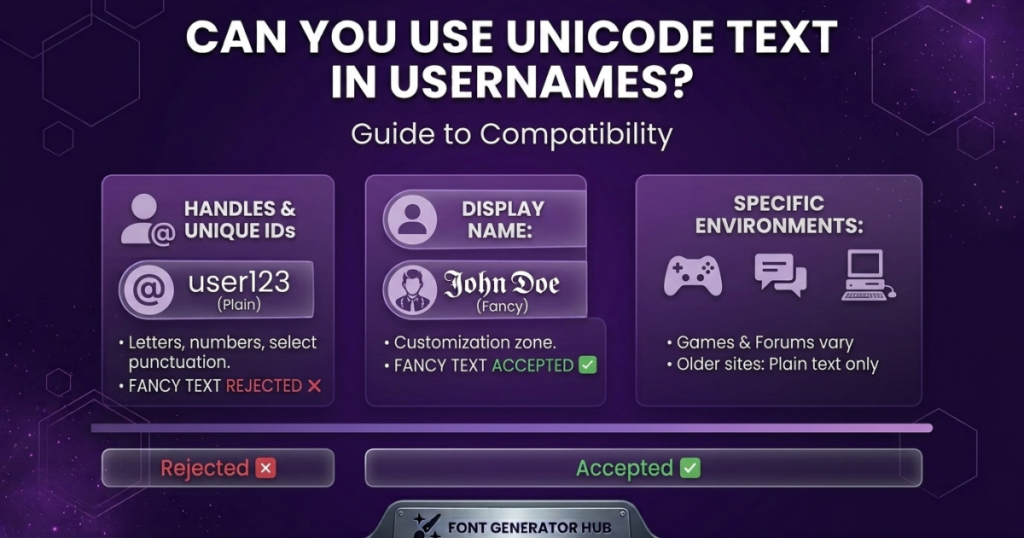
It depends on the platform — and on which field you mean. Most platforms split your identity into two parts: a unique @username / handle (usually restricted to plain letters, numbers, and underscores) and a display name (which often does accept Unicode). So on most sites, you can’t put fancy text in the actual @handle, but you can style your display name. A few platforms and games allow more.
This guide breaks down exactly where Unicode usernames work, which characters are safest, and what to do when one gets rejected.
What Is Unicode Text in a Username?
Unicode text in a username means using special Unicode characters — styled letters (𝓼𝓱𝓪𝓭𝓸𝔀), symbols (★ 乂 ꧁꧂), or decorative marks — instead of plain letters, to make your name look distinctive. These aren’t fonts; they’re different characters that already look styled, so they display without anyone installing anything. (See how fancy fonts work for the full explanation.)
The catch is that a username is often more restricted than other text fields, because platforms use it as a unique identifier — which is where the rules come in.
Watch out for look-alike characters in usernames — some Unicode letters look identical to normal ones but break search and matching.
Can Unicode Characters Be Used in Usernames?
The honest answer has three parts:
It Depends on the Platform
- @Username / handle (the unique @you): most platforms — Instagram, TikTok, X, Reddit — allow only letters, numbers, periods, and underscores here. Unicode fancy text is rejected.
- Display name (the name shown above/beside your handle): this usually does accept Unicode, so it’s where fancy text goes.
- Games: vary widely — some accept Unicode display names, some filter heavily (PUBG, Free Fire), some allow only plain characters.
- Forums / older sites: often plain-text only.
Ever had a short-looking username rejected for being too long? Here’s why fancy text changes your username length — code points, bytes, and how to fix it.
Supported vs Unsupported Characters
Even where Unicode is allowed, not every character works — common styled letters and symbols usually do; rare or decorative ones may be stripped or rejected.
Character Limits and Username Rules
Usernames have length limits, and styled/symbol characters count toward them (sometimes as more than one character). Many platforms also ban spaces and certain symbols in the handle.
Which Unicode Characters Usually Work in Usernames?
Where a platform allows styling (mainly display names), here’s the reliability ladder:
- Letters and numbers — always work (they’re the baseline)
- Common symbols (★ ♛ ✧ 乂 ꧁꧂) — usually work in display names and games that allow symbols
- Decorative Unicode characters (frames, flourishes) — often work, but less reliably; some platforms strip them
- Characters that may cause problems — rare mathematical/technical characters, heavy combining marks (zalgo), and obscure symbols are the most likely to be rejected or show as boxes
Rule of thumb: the more common the character, the more likely it works. Bold, small caps, and one or two common symbols are the safe zone.
Why Some Fancy Unicode Usernames Don’t Work
When a styled username fails, it’s usually one of these:
- The field is the @handle, not the display name — handles require plain characters
- The platform filters the characters — many games and some apps strip non-standard text
- A character isn’t supported — the platform’s font can’t draw it (shows a box)
- It exceeds the character limit — styled/symbol characters pushed it over
- A banned symbol — some platforms block specific symbols in names
Almost always, the fix is to move the styling to the display name, simplify the characters, or shorten it.
Unicode Username vs Regular Username
| Feature | Regular Username | Unicode Username |
|---|---|---|
| Standard letters | ✓ | ✓ |
| Special characters | Limited | More options |
| Compatibility | Usually high | Varies by platform |
| Appearance | Standard | More styles |
| Works as the @handle | Yes | Rarely |
| Works as a display name | Yes | Often |
| Searchable / typeable | Easy | Can be harder |
The honest summary: a regular username is the safe, universal choice; a Unicode username adds style but works mainly in display names, not handles, and its compatibility varies.
How to Create a Unicode Username
- Enter your name in a font generator.
- Choose a Unicode style — bold, cursive, gothic, or a symbol-wrapped look.
- Copy the result.
- Paste it into the username (display name) field.
- Check whether the platform accepts it — save and see if it sticks or gets rejected.
For gaming names specifically (with per-game rules and limits), see our gaming fonts hub; for social display names, the social media fonts hub; or the fancy font generator for general styling.
How to Check If a Unicode Username Is Supported
Before committing (especially if a rename costs money, like in games):
- Paste it into the field and see if the platform accepts or rejects it.
- Check it displays correctly — no boxes, nothing stripped.
- View it on another device if you can — confirm it’s not just rendering on yours.
- Send it to a friend (for a game name) to see how it appears to others.
- Keep it within the character limit — count styled/symbol characters.
If it shows boxes or gets shortened, switch to a simpler style before saving.
Why Unicode Usernames Can Look Different on Different Devices
The same Unicode username can look different across phones and computers because Unicode identifies the character, but each device’s fonts draw it — so the same code point renders with a different glyph on iPhone vs Android vs Windows. Common styles (bold, cursive, small caps) look consistent almost everywhere; rare decorative characters vary most, or show as boxes on older devices. (For the full explanation, see why fancy text shows as boxes.)
What to Do If Your Unicode Username Is Rejected
- Move the styling to the display name — if the @handle rejects it, style the display name instead (that’s what shows most prominently anyway).
- Simplify the style — swap decorative characters for bold, small caps, or a common symbol.
- Shorten it — remove symbols to fit the character limit.
- Remove banned symbols — try common ones (★, brackets) instead of obscure marks.
- Keep a plain version — for the handle, use plain text and save the styling for the display name.
Are Unicode Usernames Safe to Use?
Yes — a Unicode username is just text characters, so there’s no app, download, or account risk beyond normal typing. Two honest cautions, though:
- Lookalike characters — because some Unicode characters mimic normal letters, platforms sometimes restrict them to prevent impersonation. Using them normally is fine; using them to imitate someone else can break rules.
- Searchability — a heavily styled username can be harder for others to search or type, so keep important accounts recognizable.
Frequently Asked Questions
Can you use Unicode text in usernames?
In the display name, usually yes; in the actual @handle, usually no (handles require plain letters, numbers, and underscores). It varies by platform.
Can I use Unicode in my Instagram username?
Not in the @username (letters, numbers, periods, underscores only) — but yes in your display name and bio. Style those instead.
Can Unicode characters be used in gaming usernames?
Often in display names, yes — but games filter names differently (PUBG and Free Fire are strict). Bold and gothic are most reliable; test before spending a rename. See our gaming fonts hub.
Why does my Unicode username show as squares?
The platform’s font can’t draw that character (a missing glyph). Switch to a common style like bold or small caps.
Can Unicode usernames be searched easily?
Not always — styled characters can be harder to search or type than plain ones. For discoverability, keep the searchable handle plain and style the display name.
Can I change a Unicode username back to normal text?
Yes — retype it plainly, or use a Unicode-to-text converter for styled letters (decorative symbols get dropped).
What are some Unicode usernames?
Styled display names like 𝓼𝓱𝓪𝓭𝓸𝔀, 𝗩𝗢𝗥𝗧𝗘𝗫, or symbol-wrapped ꧁𝓐𝓵𝓮𝔁꧂ — built by styling a base name in a generator.
What characters are allowed in usernames?
For @handles, typically letters, numbers, periods, and underscores. Display names are more flexible and often accept Unicode.
What character is this █ (or ☐)?
Usually a fallback shown when a character can’t be displayed — a “missing glyph” block or box. If it appears in your username, that character isn’t supported there; use a common style instead.
Are Unicode usernames against the rules?
Normal styling isn’t — but using lookalike characters to impersonate someone, or to disguise banned words, breaks most platforms’ rules.
Which is better, Unicode or ASCII?
For usernames and modern text, Unicode — it supports every language, symbol, and styled character, while ASCII only covers basic English letters, numbers, and a few symbols (128 characters total). ASCII is actually a small subset of Unicode (the first 128 Unicode characters are identical to ASCII), so Unicode does everything ASCII does and far more. That said, many platforms restrict usernames to the ASCII range (plain letters, numbers, underscores) for the @handle — which is why fancy Unicode text usually works in your display name and bio rather than the handle itself.
Conclusion
So — can you use Unicode text in usernames? In your display name, usually yes; in the actual @handle, usually no. Most platforms reserve the unique handle for plain characters and let you style the display name freely. Where styling is allowed, stick to common characters (bold, small caps, a symbol or two), keep it within the limit, test before saving, and keep a plain version for anything that needs to be searchable.
Ready to style yours? Try the social media or gaming font hubs.