
What Font Does Discord Use?
Quick Answer
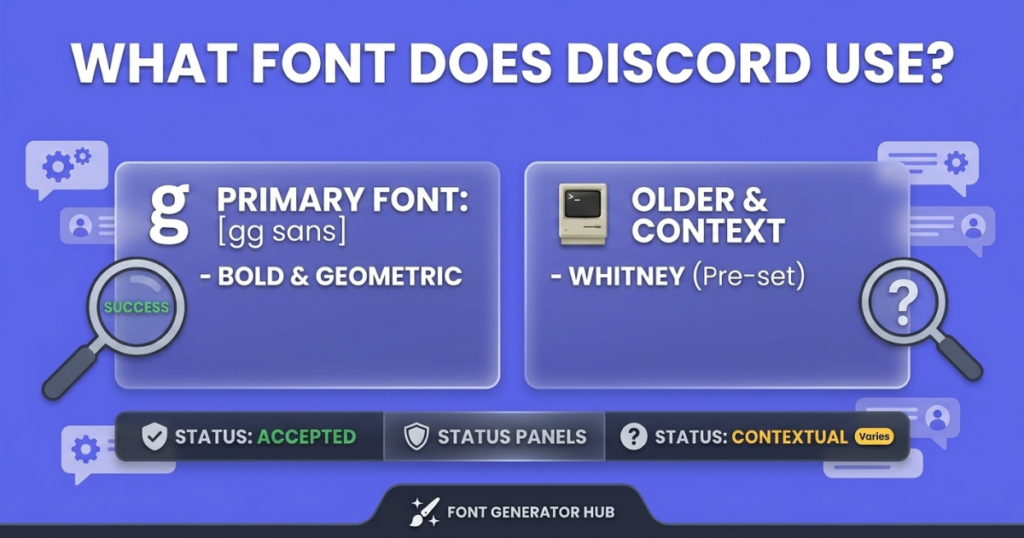
Discord uses gg sans, its own custom, proprietary sans-serif font, for the app interface, chat, menus, and website. It rolled out on December 1, 2022, replacing the previous font, Whitney. For its logo and branding, Discord uses a customized version of the Ginto family (Ginto Discord and Ginto Discord Nord). gg sans isn’t publicly downloadable — but if you want to style your own text in your Discord name, bio, or messages, that’s done with copy-paste Unicode text, which is a different thing (covered below).
What Font Does Discord Use in Its App?
Discord’s product interface — every chat message, menu, button, and label — uses gg sans, a custom geometric humanist sans-serif that Discord designed for itself. It’s described as sitting between clean geometric shapes and warmer humanist letterforms, with a medium x-height and open apertures that keep text readable in fast-moving, dense chat.
Discord even built a little identity into it: the font highlights its lowercase “g” as a nod to Discord’s gaming roots — “gg” being gamer shorthand for “good game” (and the basis of discord.gg links).
Discord’s Font History: From Whitney to gg sans
Before gg sans, Discord used Whitney — a humanist sans-serif designed by Tobias Frere-Jones, originally created for New York’s Whitney Museum of American Art. Whitney served Discord well through its early growth: clean, professional, and readable.
So why the switch? A few honest reasons the sources point to:
- Licensing — Whitney was a third-party commercial font Discord had to license. Owning a custom font removes that dependency.
- Customization — with its own font, Discord can tweak letterforms freely.
- Language support — Whitney had limits with extended scripts and less common characters; a custom font let Discord control glyph coverage for broader international support (languages like Vietnamese weren’t always rendered elegantly under Whitney).
Discord announced the change on November 29, 2022, and rolled gg sans out across all platforms — desktop, mobile, and website — starting December 1, 2022.
Discord’s Logo & Branding Font (Ginto)
Discord’s typography is actually a three-tier system that separates branding from product:
- Logo & headlines: a customized version of Ginto Discord Nord (a geometric sans by Seb McLauchlan, via the Dinamo foundry), introduced in a 2021 brand refresh led by Studio Koto and AKQA. Used for bold headlines and the logo wordmark.
- Subheads & body (marketing): Ginto Discord.
- Product UI & chat: gg sans.
So the font in Discord’s logo is a modified Ginto — not gg sans, and not the chat font.
Can You Download gg sans?
Honestly, no — gg sans isn’t publicly available. It’s Discord’s proprietary typeface, not released for public download or use. Some third-party sites host unofficial fan-made recreations of gg sans, but honest caution: those are approximations, not the real font, and using them in a commercial project carries real licensing risk since they may copy proprietary glyph designs.
The branding font, Ginto Nord, is a commercial font (available through the Dinamo foundry) — but it’s paid, and Discord’s version has custom modifications not in the retail release.
So there’s no legitimate free download of Discord’s actual fonts. If you want a similar look for a design project, see the alternatives below.
What’s the Closest Font to gg sans?
Since gg sans isn’t available, people look for similar geometric humanist sans-serifs. Honest free alternatives (from Google Fonts, so genuinely free for any use) that get you a comparable clean, rounded, readable look:
- Inter — a popular geometric humanist sans, very close in feel
- Poppins — geometric and rounded
- Nunito Sans — humanist with rounded terminals
- Rubik — geometric with slightly rounded corners
None are exactly gg sans (nothing free is), but these give a similar modern, friendly, readable vibe for a design, thumbnail, or mockup.
Can You Change Discord’s Font?
Not officially — Discord doesn’t have a built-in font setting. You can’t switch gg sans for another font in the app through normal settings. What you can adjust:
- Font size — Discord’s Appearance settings have a Chat Font Scaling slider.
- On desktop only, technically savvy users sometimes use third-party client mods (like BetterDiscord) to change the UI font — but honest caution: client mods violate Discord’s Terms of Service and can get your account actioned, so this isn’t recommended.
For mobile, there’s no way to change the UI font — mobile apps rely on the platform’s text engine.
How to Style YOUR Text in Discord (Names, Bios & Messages)
Here’s what most people actually want when they search this — not Discord’s UI font, but how to make their own text look fancy. That’s a different thing, and it’s easy:
Discord’s UI font (gg sans) is fixed, but you can style the text you type using copy-paste Unicode fonts — bold, italic, gothic, cursive, and more. These are special characters that work in your:
- Username / display name
- Server nickname
- “About Me” bio
- Messages and channel names
Discord also has its own native Markdown formatting for messages — **bold**, *italic*, ~~strikethrough~~, and `code` — but that only works in chat messages, not in your name or bio. For names and bios, Unicode fonts are the way.
To style your text, type it into our Discord font generator, pick a style, copy it, and paste it into Discord. (One note: your base @username has character restrictions, so fancy text works best in your display name and server nicknames.)
Frequently Asked Questions
What font does Discord use?
gg sans — Discord’s custom proprietary sans-serif — for its app, chat, and menus (since December 2022). The logo uses a customized Ginto font.
What was Discord’s font before gg sans?
Whitney, a humanist sans-serif by Tobias Frere-Jones, was used until December 2022.
What is the closest font to gg sans?
Free alternatives with a similar geometric-humanist feel include Inter, Poppins, Nunito Sans, and Rubik (all free on Google Fonts). None are exact, since gg sans isn’t public.
Can I download gg sans?
No — it’s Discord’s proprietary font and isn’t publicly available. Fan-made recreations exist but aren’t the real font and carry licensing risk.
How do I import a font into Discord?
You can’t import a font into Discord officially — there’s no font-upload feature, and the UI font (gg sans) is fixed. To style your text, use copy-paste Unicode fonts instead of importing a font.
How do I change my Discord name font?
Type your name into a Discord font generator, pick a style, copy it, and paste it into your display name or server nickname. It uses Unicode characters, so it works without changing Discord’s actual font.
Can I change Discord’s interface font?
Not through official settings (only font size, via Chat Font Scaling). Third-party client mods can, but they violate Discord’s Terms of Service.
Does Discord use the same font on mobile and desktop?
Yes — gg sans is used across desktop, mobile, and the website.
Bottom Line
Discord uses gg sans (its own custom font, since December 2022, replacing Whitney) for the app and chat, and a customized Ginto for its logo and branding. You can’t download gg sans or change Discord’s interface font officially — but you can style your own name, bio, and messages with copy-paste Unicode fonts.
Want to make your Discord text stand out? Try our Discord font generator.